顯示具有 Elixir 標籤的文章。 顯示所有文章

2018/11/05

Phoenix_9_OTP

Managing State with Processes

Functional programs are stateless,改用 Process 保存 state

新增 /rumbl/ib/rumbl/counter.ex

defmodule Rumbl.Counter do

  def inc(pid), do: send(pid, :inc)

  def dec(pid), do: send(pid, :dec)

  def val(pid, timeout \\ 5000) do 
    ref = make_ref()
    send(pid, {:val, self(), ref})
    receive do
      {^ref, val} -> val
    after timeout -> exit(:timeout)
    end
  end

  def start_link(initial_val) do 
    {:ok, spawn_link(fn -> listen(initial_val) end)}
  end

  defp listen(val) do 
    receive do
      :inc -> listen(val + 1)
      :dec -> listen(val - 1)
      {:val, sender, ref} ->
        send sender, {ref, val}
        listen(val)
    end
  end
end

這是一個獨立的 counter service,Counter API 有三個

  1. :inc
  2. :dec
  3. :val

:inc :dec 是非同步的呼叫

:val 不同,發送 message 後,會用 receive 等待回應。

make_ref() 是一個 global unique reference,可在 global (cluster) 環境中運作。

^ref 表示我們是以 pattern matching 的方式,判斷是不是回傳了正確的 process reference

OTP 需要一個 startlink function,並以 initialval 為 counter 初始的 state

程式中沒有看到任何 global variable 儲存 state,而是呼叫 listen,listen 會以 receive 去 block 並等待 message,而 val 就是放在這個 function 的參數上。process state 是用 recursive function 的方式不斷重複發送給下一個 listen,這是 tail recursive。


測試 Counter

$ iex -S mix

iex(1)> alias Rumbl.Counter
Rumbl.Counter
iex(2)> {:ok, counter} = Counter.start_link(0)
{:ok, #PID<0.270.0>}
iex(3)> Counter.inc(counter)
:inc
iex(4)> Counter.inc(counter)
:inc

iex(5)> Counter.val(counter)
2
iex(6)> Counter.dec(counter)
:dec
iex(7)> Counter.val(counter)
1

Building GenServer for OTP

更新 /lib/rumbl/counter.ex

defmodule Rumbl.Counter do
  use GenServer

  def inc(pid), do: GenServer.cast(pid, :inc)

  def dec(pid), do: GenServer.cast(pid, :dec)

  def val(pid) do
    GenServer.call(pid, :val)
  end

  def start_link(initial_val) do
    GenServer.start_link(__MODULE__, initial_val)
  end

  def init(initial_val) do
    {:ok, initial_val}
  end

  def handle_cast(:inc, val) do
    {:noreply, val + 1}
  end

  def handle_cast(:dec, val) do
    {:noreply, val - 1}
  end

  def handle_call(:val, _from, val) do
    {:reply, val, val}
  end
end

GenServer.cast 是非同步呼叫,server 以 handle_cast 處理,最後會 return {:noreply, val + 1} ,因為呼叫者不需要這個 reply message

GenServer.call 是同步呼叫,server 以 handle_call 處理

測試

$ iex -S mix
iex(1)> alias Rumbl.Counter
Rumbl.Counter
iex(2)> {:ok, counter} = Counter.start_link(0)
{:ok, #PID<0.269.0>}
iex(3)> Counter.inc(counter)
:ok
iex(4)> Counter.val(counter)
1
iex(5)> Counter.dec(counter)
:ok
iex(6)> Counter.val(counter)
0

Adding Failover

利用 Supervisor 監控 counter

Phoenix 並沒有很多處理 fail exception 的 code,而是以 error reporting 的方式處理,同時加上自動 restart service。

修改 /lib/rumbl.ex

defmodule Rumbl do
  use Application

  # See http://elixir-lang.org/docs/stable/elixir/Application.html
  # for more information on OTP Applications
  def start(_type, _args) do
    import Supervisor.Spec, warn: false

    children = [
      supervisor(Rumbl.Endpoint, []),
      supervisor(Rumbl.Repo, []),
      worker(Rumbl.Counter, [5]), # new counter worker
    ]

    opts = [strategy: :one_for_one, name: Rumbl.Supervisor]
    Supervisor.start_link(children, opts)
  end

  # Tell Phoenix to update the endpoint configuration
  # whenever the application is updated.
  def config_change(changed, _new, removed) do
    Rumbl.Endpoint.config_change(changed, removed)
    :ok
  end
end

child spec 定義 Elixir application 要啟動的 children,將 counter 這個 worker 加入 children list。

opts 是 supervision policy,這裡是使用 :oneforone

:oneforall 是 kill and restart all child processes


在 /lib/rumbl/counter.ex 加上 :tick 及處理 :tick 的 handle_info,每 1000ms 就倒數一次

  def init(initial_val) do
    Process.send_after(self, :tick, 1000)
    {:ok, initial_val}
  end

  def handle_info(:tick, val) do
    IO.puts "tick #{val}"
    Process.send_after(self, :tick, 1000)
    {:noreply, val - 1}
  end

再加上一點檢查,只倒數到 0 ,就會 raise exception,OTP process 會 crash

def init(initial_val) do
    Process.send_after(self, :tick, 1000)
    {:ok, initial_val}
  end

  def handle_info(:tick, val) when val <= 0, do: raise "boom!"
  def handle_info(:tick, val) do
    IO.puts "tick #{val}"
    Process.send_after(self, :tick, 1000)
    {:noreply, val - 1}
  end

但可發現它會自動重新啟動

$ iex -S mix
iex(1)> tick 5
tick 4
tick 3
tick 2
tick 1
[error] GenServer #PID<0.365.0> terminating
** (RuntimeError) boom!
    (rumbl) lib/rumbl/counter.ex:21: Rumbl.Counter.handle_info/2
    (stdlib) gen_server.erl:616: :gen_server.try_dispatch/4
    (stdlib) gen_server.erl:686: :gen_server.handle_msg/6
    (stdlib) proc_lib.erl:247: :proc_lib.init_p_do_apply/3
Last message: :tick
State: 0
tick 5
tick 4
tick 3
tick 2
tick 1

Restart Strategies

預設 child processes 的 restart strategy 是 :permanent,也可以用 restart 指定

worker(Rumbl.Counter, [5], restart: :permanent),
  1. :permanent

    child is always restarted (default)

  2. :temporary

    child is never restarted

  3. :transient

    只在異常終止時 restart,也就是 :normal, :shutdown, {:shutdown, term} 以外的 exit reason

另外還有 maxrestarts 及 maxseconds 參數,在 maxsecodns 時間內可以 restart maxrestarts 次

預設是 3 restarts in 5 seconds

Supervision Strategies

  1. :oneforone

    a child terminates -> supervisor restars only that process

  2. :oneforall

    a child tetminates -> supervisor terminates all children and restarts them

  3. :restforone

    a child terminates -> supervisor terminates all child processes defiend after the one that dies,並 restart all terminated processes

  4. :simpleonefor_one

    類似 :oneforone,用在 supervisor 需要動態 supervise processes 的情況,例如 web server 需要 supervise web requests,通常有 10 ~ 100,000 個 concurrent running processes

把 strategy 換成 :oneforall 測試

def start(_type, _args) do
    import Supervisor.Spec, warn: false

    children = [
      supervisor(Rumbl.Endpoint, []),
      supervisor(Rumbl.Repo, []),
      worker(Rumbl.Counter, [5]), # new counter worker
    ]

    opts = [strategy: :one_for_all, name: Rumbl.Supervisor]
    Supervisor.start_link(children, opts)
  end

啟動 Phoenix server 會發現 Cowboy 也 restart

tick 2
tick 1
[error] GenServer #PID<0.348.0> terminating
** (RuntimeError) boom!
    (rumbl) lib/rumbl/counter.ex:21: Rumbl.Counter.handle_info/2
    (stdlib) gen_server.erl:616: :gen_server.try_dispatch/4
    (stdlib) gen_server.erl:686: :gen_server.handle_msg/6
    (stdlib) proc_lib.erl:247: :proc_lib.init_p_do_apply/3
Last message: :tick
State: 0
[info] Running Rumbl.Endpoint with Cowboy using http://localhost:4000
tick 5

現在把 worker 拿掉,strategy 改回 :oneforone

children = [
    supervisor(Rumbl.Endpoint, []),
    supervisor(Rumbl.Repo, [])
]

opts = [strategy: :one_for_one, name: Rumbl.Supervisor]

Using Agents

agent 類似 GenServer,但只有 5 個 main functions

start_link 啟動 agent, stop 停止, update 更新 agent 狀態

$ iex -S mix

iex(1)> import Agent
Agent
iex(2)> {:ok, agent} = start_link fn -> 5 end
{:ok, #PID<0.258.0>}
iex(3)> update agent, &(&1 + 1)
:ok
iex(4)> get agent, &(&1)
6
iex(5)> stop agent
:ok

加上 :name option

iex(7)> {:ok, agent} = start_link fn -> 5 end, name: MyAgent
{:ok, #PID<0.265.0>}
iex(8)> update MyAgent, &(&1 + 1)
:ok
iex(9)> get MyAgent, &(&1)
6
iex(10)> stop MyAgent
:ok

重複名稱會發生 error

iex(11)> {:ok, agent} = start_link fn -> 5 end, name: MyAgent
{:ok, #PID<0.271.0>}
iex(12)> {:ok, agent} = start_link fn -> 5 end, name: MyAgent
** (MatchError) no match of right hand side value: {:error, {:already_started, #PID<0.271.0>}}

Phoenix.Channel 就是用 Agent 實作

Design an Information System with OTP

新增 /lib/rumbl/infosyssupervisor.ex


defmodule Rumbl.InfoSys.Supervisor do
  use Supervisor

  def start_link() do
    Supervisor.start_link(__MODULE__, [], name: __MODULE__)
  end

  def init(_opts) do
    children = [
      worker(Rumbl.InfoSys, [], restart: :temporary)
    ]

    supervise children, strategy: :simple_one_for_one
  end
end

修改 /lib/rumbl.ex

    children = [
      supervisor(Rumbl.Endpoint, []),
      supervisor(Rumbl.InfoSys.Supervisor, []), # new supervisor
      supervisor(Rumbl.Repo, []),
#      worker(Rumbl.Counter, [5]), # new counter worker
    ]

Building a start_link Proxy

啟動時動態決定要幾個 service,要製作一個 worker,可啟動多個 backends

proxy function 是 client, server 之間的 lightweight function interface

新增 /lib/rumbl/info_sys.ex


defmodule Rumbl.InfoSys do
  @backends [Rumbl.InfoSys.Wolfram]

  defmodule Result do
    defstruct score: 0, text: nil, url: nil, backend: nil
  end

  def start_link(backend, query, query_ref, owner, limit) do 
    backend.start_link(query, query_ref, owner, limit)
  end

  def compute(query, opts \\ []) do 
    limit = opts[:limit] || 10
    backends = opts[:backends] || @backends

    backends
    |> Enum.map(&spawn_query(&1, query, limit))
  end

  defp spawn_query(backend, query, limit) do 
    query_ref = make_ref()
    opts = [backend, query, query_ref, self(), limit]
    {:ok, pid} = Supervisor.start_child(Rumbl.InfoSys.Supervisor, opts)
    {pid, query_ref}
  end
end

InfoSys 跟一般 GenServer 有一點不同,裡面存放到 results 到 module attribute -> 所有支援的 backends 為 list

Result struct 會儲存每個 search result 的結果,還有 score 及 relevnace, text to describe the result, url

startlink 就是 proxy,會再呼叫其他 backend 的 startlink

compute 會 maps over all backends,呼叫每個 backend 的 spawn_query

Building the Wolfram into System

修改 /rumbl/mix.exs

{:sweet_xml, "~> 0.5.0"},
mix deps.get

wolfram 申請帳號,及 APP ID

APP NAME: wolfram
APPID: LP93J3-XXXXXXXXXX

新增設定 /config/dev.secret.exs

use Mix.Config
config :rumbl, :wolfram, app_id: "LP93J3-XXXXXXXXXX"

記得將 /config/dev.secret.exs 放到 .gitignore

修改 /config/dev.exs,最後面加上

import_config "dev.secret.exs"

新增 /lib/rumbl/info_sys/wolfram.ex

defmodule Rumbl.InfoSys.Wolfram do
  import SweetXml
  alias Rumbl.InfoSys.Result

  def start_link(query, query_ref, owner, limit) do 
    Task.start_link(__MODULE__, :fetch, [query, query_ref, owner, limit])
  end

  def fetch(query_str, query_ref, owner, _limit) do 
    query_str
    |> fetch_xml()
    |> xpath(~x"/queryresult/pod[contains(@title, 'Result') or
                                 contains(@title, 'Definitions')]
                            /subpod/plaintext/text()")
    |> send_results(query_ref, owner)
  end

  defp send_results(nil, query_ref, owner) do 
    send(owner, {:results, query_ref, []})
  end
  defp send_results(answer, query_ref, owner) do
    results = [%Result{backend: "wolfram", score: 95, text: to_string(answer)}]
    send(owner, {:results, query_ref, results})
  end

  defp fetch_xml(query_str) do 
    {:ok, {_, _, body}} = :httpc.request(
      String.to_char_list("http://api.wolframalpha.com/v2/query" <>
        "?appid=#{app_id()}" <>
        "&input=#{URI.encode(query_str)}&format=plaintext"))
    body
  end

  defp app_id, do: Application.get_env(:rumbl, :wolfram)[:app_id]
end

這個 module 並沒有 GenServer 的 callbacks,因為這個 process 是一個 task,GenServer 是一個 generic server 可計算並儲存 state,但有時我們只需要 store state 或是 只需要執行某個 function。

Agent 是簡化的 GenServer 可儲存 state task 是個簡單的 process 可執行某個 function

SweetXml 用來 parse XML,Result 是 the struct for the results

Task.start_link 是啟動 Task 的方式

fetch_xml 裡面試用 :httpc,這是 erlang 的 standard library,可處理 HTTP request

sendresults(queryref, owner) 將結果回傳給 requester

有兩種 send_results,分為有 answer 或沒有

先用 iex -S mix 測試

iex(4)> Rumbl.InfoSys.compute("what is elixir?")
[{#PID<0.592.0>, #Reference<0.3775272462.1982070785.26789>}]
iex(5)> flush()
:ok
iex(6)> flush()
:ok
iex(7)> flush()
{:results, #Reference<0.3775272462.1982070785.26789>,
 [%Rumbl.InfoSys.Result{backend: "wolfram", score: 95,
   text: "1 | noun | a sweet flavored liquid (usually containing a small amount of alcohol) used in compounding medicines to be taken by mouth in order to mask an unpleasant taste\n2 | noun | hypothetical substance that the alchemists believed to be capable of changing base metals into gold\n3 | noun | a substance believed to cure all ills",
   url: nil}]}
:ok

要讓 service 更堅固,必須做以下工作

  1. 偵測 backend crash,這樣就不要等 results

  2. 由 backend 取得結果要根據 score 排序

  3. 需要 timeout 機制


Monitoring Processes

使用 Process.monitor 在 waiting results 時偵測 backend crashes,一但設定了 monitor,會在該 process dies 時,收到 message。

測試

iex(1)> pid = spawn(fn -> :ok end)
#PID<0.261.0>
iex(2)> Process.monitor(pid)
#Reference<0.777943872.2254438401.3282>
iex(3)> flush()
{:DOWN, #Reference<0.777943872.2254438401.3282>, :process, #PID<0.261.0>,
 :noproc}
:ok

修改 /lib/rumbl/info_sys.ex

defmodule Rumbl.InfoSys do
  @backends [Rumbl.InfoSys.Wolfram]

  defmodule Result do
    defstruct score: 0, text: nil, url: nil, backend: nil
  end

  def start_link(backend, query, query_ref, owner, limit) do
    backend.start_link(query, query_ref, owner, limit)
  end

  def compute(query, opts \\ []) do
    limit = opts[:limit] || 10
    backends = opts[:backends] || @backends

    backends
    |> Enum.map(&spawn_query(&1, query, limit))
    |> await_results(opts)
    |> Enum.sort(&(&1.score >= &2.score))
    |> Enum.take(limit)
  end

  defp spawn_query(backend, query, limit) do
    query_ref = make_ref()
    opts = [backend, query, query_ref, self(), limit]
    {:ok, pid} = Supervisor.start_child(Rumbl.InfoSys.Supervisor, opts)
    monitor_ref = Process.monitor(pid)
    {pid, monitor_ref, query_ref}
  end

  defp await_results(children, _opts) do
    await_result(children, [], :infinity)
  end

  defp await_result([head|tail], acc, timeout) do
    {pid, monitor_ref, query_ref} = head

    receive do
      {:results, ^query_ref, results} ->
        Process.demonitor(monitor_ref, [:flush])
        await_result(tail, results ++ acc, timeout)
      {:DOWN, ^monitor_ref, :process, ^pid, _reason} ->
        await_result(tail, acc, timeout)
    end
  end

  defp await_result([], acc, _) do
    acc
  end
end

compute 會自動等待 results,收到時,會 sorting by score,並回報 top ones

spawn_query 裡面增加了 Process.monitor(pid)

awaitresults 是 recursive function,在每次呼叫 awaitresults 就會新增一個 result 到 list

正確的 result 會 match {:results, ^query_ref, result}

Process.demonitor(monitor_ref, [:flush]) 是將 monitor process 移除

現在 compute 會自動處理結果

iex(1)> Rumbl.InfoSys.compute("what is the meaning of life?")
[%Rumbl.InfoSys.Result{backend: "wolfram", score: 95,
  text: "42\n(according to the book The Hitchhiker's Guide to the Galaxy, by Douglas Adams)",
  url: nil}]

Timeout

receive 可設定 after 這個 timeout 機制

receive do
  :this_will_never_arrive -> :ok
after
  1_000 -> :timedout
end

修改 /lib/rumbl/infosys.ex 等待 backend 5000 ms


defmodule Rumbl.InfoSys do
  @backends [Rumbl.InfoSys.Wolfram]

  defmodule Result do
    defstruct score: 0, text: nil, url: nil, backend: nil
  end

  def start_link(backend, query, query_ref, owner, limit) do
    backend.start_link(query, query_ref, owner, limit)
  end

  def compute(query, opts \\ []) do
    limit = opts[:limit] || 10
    backends = opts[:backends] || @backends

    backends
    |> Enum.map(&spawn_query(&1, query, limit))
    |> await_results(opts)
    |> Enum.sort(&(&1.score >= &2.score))
    |> Enum.take(limit)
  end

  defp spawn_query(backend, query, limit) do
    query_ref = make_ref()
    opts = [backend, query, query_ref, self(), limit]
    {:ok, pid} = Supervisor.start_child(Rumbl.InfoSys.Supervisor, opts)
    monitor_ref = Process.monitor(pid)
    {pid, monitor_ref, query_ref}
  end

  defp await_results(children, opts) do
    timeout = opts[:timeout] || 5000
    timer = Process.send_after(self(), :timedout, timeout) 
    results = await_result(children, [], :infinity)
    cleanup(timer)
    results
  end

  defp await_result([head|tail], acc, timeout) do
    {pid, monitor_ref, query_ref} = head

    receive do
      {:results, ^query_ref, results} ->
        Process.demonitor(monitor_ref, [:flush])
        await_result(tail, results ++ acc, timeout)
      {:DOWN, ^monitor_ref, :process, ^pid, _reason} ->
        await_result(tail, acc, timeout)
      :timedout -> 
        kill(pid, monitor_ref)
        await_result(tail, acc, 0)
    after
      timeout ->
        kill(pid, monitor_ref)
        await_result(tail, acc, 0)
    end
  end

  defp await_result([], acc, _) do
    acc
  end

  defp kill(pid, ref) do 
    Process.demonitor(ref, [:flush])
    Process.exit(pid, :kill)
  end

  defp cleanup(timer) do  
    :erlang.cancel_timer(timer)
    receive do
      :timedout -> :ok
    after
      0 -> :ok
    end
  end
end

Integrating OTP Services with Channels

將剛剛的服務放到 VideoChannel 中

修改 /web/channels/video_channel.ex


defmodule Rumbl.VideoChannel do
  use Rumbl.Web, :channel
  alias Rumbl.AnnotationView

  def join("videos:" <> video_id, params, socket) do
    last_seen_id = params["last_seen_id"] || 0
    video_id = String.to_integer(video_id)
    video = Repo.get!(Rumbl.Video, video_id)

    annotations = Repo.all(
      from a in assoc(video, :annotations),
      where: a.id > ^last_seen_id,
      order_by: [asc: a.at, asc: a.id],
      limit: 200,
      preload: [:user]
    )
    resp = %{annotations: Phoenix.View.render_many(annotations, AnnotationView,
      "annotation.json")}

    {:ok, resp, assign(socket, :video_id, video.id)}
  end

  def handle_in(event, params, socket) do
    user = Repo.get(Rumbl.User, socket.assigns.user_id)
    handle_in(event, params, user, socket)
  end

  def handle_in("new_annotation", params, user, socket) do
    changeset =
      user
      |> build_assoc(:annotations, video_id: socket.assigns.video_id)
      |> Rumbl.Annotation.changeset(params)

    case Repo.insert(changeset) do
      {:ok, ann} ->
        broadcast_annotation(socket, ann)
        Task.start_link(fn -> compute_additional_info(ann, socket) end)
        {:reply, :ok, socket}

      {:error, changeset} ->
        {:reply, {:error, %{errors: changeset}}, socket}
    end
  end

  defp broadcast_annotation(socket, annotation) do
    annotation = Repo.preload(annotation, :user)
    rendered_ann = Phoenix.View.render(AnnotationView, "annotation.json", %{
      annotation: annotation
    })
    broadcast! socket, "new_annotation", rendered_ann
  end

  defp compute_additional_info(ann, socket) do
    for result <- Rumbl.InfoSys.compute(ann.body, limit: 1, timeout: 10_000) do
      attrs = %{url: result.url, body: result.text, at: ann.at}
      info_changeset =
        Repo.get_by!(Rumbl.User, username: result.backend)
        |> build_assoc(:annotations, video_id: ann.video_id)
        |> Rumbl.Annotation.changeset(attrs)

      case Repo.insert(info_changeset) do
        {:ok, info_ann} -> broadcast_annotation(socket, info_ann)
        {:error, _changeset} -> :ignore
      end
    end
  end
end

新增 /rumbl/priv/repo/backend_seeds.exs

alias Rumbl.Repo
alias Rumbl.User

Repo.insert!(%User{name: "Wolfram", username: "wolfram"})
$ mix run priv/repo/backend_seeds.exs
Compiling 19 files (.ex)
warning: String.to_char_list/1 is deprecated, use String.to_charlist/1
  lib/rumbl/info_sys/wolfram.ex:29

warning: function authenticate/2 is unused
  web/controllers/user_controller.ex:40

[debug] QUERY OK db=0.2ms queue=12.1ms
begin []
[debug] QUERY OK db=0.9ms
INSERT INTO `users` (`name`,`username`,`inserted_at`,`updated_at`) VALUES (?,?,?,?) ["Wolfram", "wolfram", {{2017, 9, 7}, {3, 55, 52, 165910}}, {{2017, 9, 7}, {3, 55, 52, 168676}}]
[debug] QUERY OK db=1.8ms
commit []
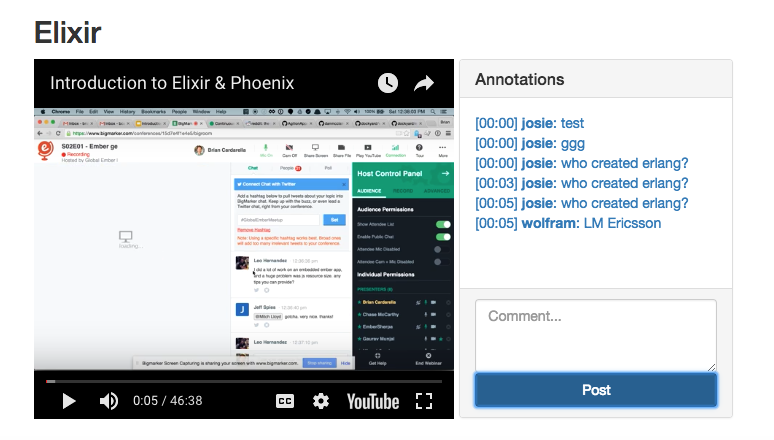
Inpsecting with Observer

erlang 有個 Observer 工具,可用這個方式啟動

:observer.start
iex -S mix

# 用這個方式啟動,可查看 Phoenix 部分的狀況
iex -S mix phoenix.server

supervision tree 是一個好的工具,可以觀察要怎麼將 application 分開。現在我們要將 application 分成兩個部分 :rumbl 及 :info_sys

利用 umbrella project 來處理

Using Umbrellas

每個 umbrella project 目錄包含以下的部分

  1. shared configuration of the project
  2. dependencies for the project
  3. apps 目錄 with child applications

要重新產生一個 umbrella project

$ mix new rumbrella --umbrella
* creating .gitignore
* creating README.md
* creating mix.exs
* creating apps
* creating config
* creating config/config.exs

Your umbrella project was created successfully.
Inside your project, you will find an apps/ directory
where you can create and host many apps:

    cd rumbrella
    cd apps
    mix new my_app

Commands like "mix compile" and "mix test" when executed
in the umbrella project root will automatically run
for each application in the apps/ directory.

將 InfoSys 移動到 rumbrella 下面

$ cd rumbrella/apps

$ mix new info_sys --sup
* creating README.md
* creating .gitignore
* creating mix.exs
* creating config
* creating config/config.exs
* creating lib
* creating lib/info_sys.ex
* creating lib/info_sys/application.ex
* creating test
* creating test/test_helper.exs
* creating test/info_sys_test.exs

Your Mix project was created successfully.
You can use "mix" to compile it, test it, and more:

    cd info_sys
    mix test

Run "mix help" for more commands.

將 InfoSys 由 rumbl 移到 info_sys

  1. 將 rumbl/lib/rumbl/infosys.ex Rumbl.InfoSys 改為 InfoSys 並複製到 infosys/lib/info_sys.ex ,前面加上

    use Application
    
    def start(_type, _args) do
    InfoSys.Supervisor.start_link()
    end
    
    @backends [InfoSys.Wolfram]
  2. 將 /rumbl/lib/rumbl/infosys/supervisor.ex Rumbl.InfoSys.Supervisor 改為 InfoSys.Supervisor 並複製到 infosys/lib/info_sys/supervisor.ex

  3. 將 /rumbl/lib/rumbl/infosys/wolfram.ex 的 Rumbl.InfoSys.Wolfram module 改為 InfoSys.Wolfram,並複製到 infosys/lib/info_sys/wolfram.ex

  4. 把所有 "Rumbl.InfoSys" 都改為 "InfoSys"

  5. 修改 lib/infosys/wolfram.ex,由 :rumbl 改為 :infosys

    defp app_id, do: Application.get_env(:info_sys, :wolfram)[:app_id]
  6. 修改 apps/info_sys/mix.exs

    def deps do
        [
        {:sweet_xml, "~> 0.5.0"}
        ]
    end
  7. 在 rumbrella 目錄執行 $ mix deps.get


將 rumbl 改為 umbrella child

  1. 將整個 rumbl 移動到 apps 目錄

  2. 修改 rumbrella/apps/rumbl/mix.exs,增加

      build_path: "../../_build",
      config_path: "../../config/config.exs",
      deps_path: "../../deps",
      lockfile: "../../mix.lock",
  3. 修改 applicaton ,增加 :info_sys

    def application do
        [mod: {Rumbl, []},
         applications: [:phoenix, :phoenix_pubsub, :phoenix_html, :cowboy, :logger, :gettext,
                        :phoenix_ecto, :mariaex, :comeonin, :info_sys]]
      end
  4. 更新 dependencies,移除 :sweetxml ,增加 :infosys

    {:info_sys, in_umbrella: true},
  5. 修改 rumbl/lib/rumbl.ex 移除 Rumbl.InfoSys

        children = [
          supervisor(Rumbl.Endpoint, []),
          supervisor(Rumbl.Repo, []),
        ]
  6. 修改 /web/channlel/videochannel.ex 的 computeadditional_info 將 Rumbl.InfoSys 改為 InfoSys

  7. 修改 cofnig/dev.secrets.exs 改為 :info_sys

    use Mix.Config
    config :info_sys, :wolfram, app_id: "LP93J3-XXXXXX"
  8. 修改 rumbl/package.json

      "dependencies": {
        "phoenix": "file:../../deps/phoenix",
        "phoenix_html": "file:../../deps/phoenix_html"
      },

在 rumbrella 目錄中

$ mix deps.get
$ mix test

References

Programming Phoenix

2018/10/29

Phoenix_8_Channels

Phoenix channel 是一個 conversation,channel 會發送, 接收 messages,並保存 state,這些 messages 稱為 events,state 會存放在稱為 socket 的 struct 內。

conversation 就是 topic,就像是 chat room, local map , a game, or a video。超過一個人在同一時間對相同的主題有興趣,Channels 可用在多個 users 之間互通訊息。因為這是用 erlang isolated, dedicated process 實作的。

網頁的 request/response 是 stateless,但 conversation 是長時間運作的的 process,是 stateful 的。

Phoenix Clients with ES6

利用 ECMAScript 6 JavaScript 功能實作 client,ES6的code 可以 transpile 為 ES5,實作 client 對 video 新增 annotations,並發送給所有 users。

每一個 Phonenix conversation 是一個 Topic,因此要先確認,要以什麼為 Topic,目前是以 video 為 topic。

新增 /web/static/js/video.js

import Player from "./player"

let Video = {

  init(socket, element){ if(!element){ return }
    let playerId = element.getAttribute("data-player-id")
    let videoId  = element.getAttribute("data-id")
    socket.connect()
    Player.init(element.id, playerId, () => { 
      this.onReady(videoId, socket)
    })
  },

  onReady(videoId, socket){
    let msgContainer = document.getElementById("msg-container")
    let msgInput     = document.getElementById("msg-input")
    let postButton   = document.getElementById("msg-submit")
    let vidChannel   = socket.channel("videos:" + videoId)
    // TODO join the vidChannel
  }
}
export default Video

socket.connect() 可產生一個 websocket

注意 let vidChannel = socket.channel("videos:" + videoId) ,這是 ES6 Client 連接 Phoenix VideoChannel 的 channel。

Topic 需要一個 identifier,我們選用 "videos:" + videoId 這個格式,我們需要在 topic 內對其他相同 topic 的 users 發送 events。


修改 /web/static/js/app.js

import "phoenix_html"

import socket from "./socket"
import Video from "./video"

Video.init(socket, document.getElementById("video"))

如果瀏覽 http://localhost:4000/watch/2-elixir 時,js console 會出現這樣的錯誤訊息。

Unable to join – {reason: "unmatched topic"}

Preparing Our Server for the Channel

傳統 web request/response 每一次都會產生一個 connection,也就是 Plug.Conn,每個新的 request 都會有新的 conn,接下來用 pipeline 處理,最後 die。

channel 的流程跟上面的不同,client 會用 socket 建立 connection,在建立連線後,socket 會在整個 connection 的過程中持續被 transformed。socket 就是 client/server 之間持續運作的 conversation。

首先要決定是否能建立 connection,然後要產生 initial socket,包含所有 custom application setup。

修改 /web/static/js/socket.js

import {Socket} from "phoenix"

let socket = new Socket("/socket", {
  params: {token: window.userToken},
  logger: (kind, msg, data) => { console.log(`${kind}: ${msg}`, data) }
})

export default socket

let socket = new Socket("/socket".... 會讓 Phoenix 建立新的 socket。

查看 /lib/rumbl/endpoint.ex,有一個 /socket 的定義,UserSocket 就是處理 socket connection 的 module。

socket "/socket", Rumbl.UserSocket

先看一下 /web/channels/user_socket.ex 的內容

defmodule Rumbl.UserSocket do
  use Phoenix.Socket

  ## Transports
  transport :websocket, Phoenix.Transports.WebSocket
  # transport :longpoll, Phoenix.Transports.LongPoll

  def connect(_params, socket) do
    {:ok, socket}
  end

  def id(_socket), do: nil
end

UserSocket 使用 connection 處理所有 channel processes。 Phoenix 支援兩種 Transport protocols: websocket 或是 longpoll,也可以自訂一個。除了 transport 不同之外,其他的部分都是一樣的。

使用 shared socket abstraction,然後讓 Phoenix 處理其他的工作。

UserSocket 有兩個 functions: connect 及 id。id 是用來識別 socket,以便儲存不同的 state。目前 id 為 nil,connect 基本上就是接受所有連線。

接下來要利用 rumbl.Auth 增加 socket authentication。

如果再一次瀏覽網址 http://localhost:4000/watch/2-elixir,在 js console 就可看到此 debug message,表示已經連上 server。

transport: connected to ws://localhost:4000/socket/websocket?token=undefined&vsn=1.0.0

Creating the Channel

channel 就是 a conversation on a topic,topic 的 id 為 videos:video_id,我們希望 user 能取得某個 topic 的所有 events,也就是 video 的所有 annotations。

topic id 的一般形式就是 topic:subtopic,topic 為 resource name,subtopic 為 ID

因為 URL 就有參數,可以識別 conversation,也就是 :id


Joining a Channel

在 /web/channels/user_socket.ex 增加一行

channel "videos:*", Rumbl.VideoChannel

videos:* conversation 以 resource name 及 ID 作為 topic 的分類方式


Building the Channel Module

新增 /web/channels/video_channel.ex

defmodule Rumbl.VideoChannel do
  use Rumbl.Web, :channel

  def join("videos:" <> video_id, _params, socket) do
    {:ok, assign(socket, :video_id, String.to_integer(video_id))}
  end
end

channel 的第一個 callback 就是 join,clients 可 join topics on a channel,如果成功就回傳 {:ok, socket},拒絕連線就回傳 {:error, socket}

現在先讓所有 socket 可任意 join video topics,並新增 video ID (由 topic 取得) 到 socket.assigns。socket 會在 socket.assigns 儲存某個 conversation 的所有狀態 state。

socket 會被 transformed 為 loop,而不是一連串的 pipelines。當 events 進出 channel 時,可同時存取 socket state。

修改 /web/static/js/video.js

import Player from "./player"

let Video = {

    init(socket, element){ if(!element){ return }
        let playerId = element.getAttribute("data-player-id")
        let videoId  = element.getAttribute("data-id")
        socket.connect()
        Player.init(element.id, playerId, () => {
            this.onReady(videoId, socket)
    })
    },

    onReady(videoId, socket){
        let msgContainer = document.getElementById("msg-container")
        let msgInput     = document.getElementById("msg-input")
        let postButton   = document.getElementById("msg-submit")
        
        // 以 "videos:" videoId 產生新的 channel object
        let vidChannel   = socket.channel("videos:" + videoId)

        vidChannel.join()
            .receive("ok", resp => console.log("joined the video channel", resp) )
    .receive("error", reason => console.log("join failed", reason) )
    }
}
export default Video

如果再一次瀏覽網址 http://localhost:4000/watch/2-elixir,在 js console 就可看到

[Log] push: videos:2 phx_join (1) – {} (app.js, line 1586)
[Log] receive: ok videos:2 phx_reply (1) – {status: "ok", response: {}} (app.js, line 1586)
[Log] joined the video channel – {}

server 的 console log 為

[info] JOIN videos:2 to Rumbl.VideoChannel
  Transport:  Phoenix.Transports.WebSocket
  Parameters: %{}
[info] Replied videos:2 :ok

Sending and Receiving Event

在 channel 收到的訊息為 event name + payload + arbitrary data

channel 有三種接收訊息的方式:

  1. handle_in

    receives direct channel events

  2. handle_out

    intercepts broadcast events

  3. handle_info

    receives OTP messages


Taking Channels for a Trial run

目前是讓 join function 每 5 seconds 就發送一次 :ping message 到 channel

修改 /web/channels/video_channel.ex

defmodule Rumbl.VideoChannel do
  use Rumbl.Web, :channel

  def join("videos:" <> video_id, _params, socket) do
    :timer.send_interval(5_000, :ping)
    {:ok, socket}
  end

  # 當 elixir message 到達 channel 就會呼叫 handle_info
  # 目前每收到一次就將 :count +1
  def handle_info(:ping, socket) do
    count = socket.assigns[:count] || 1
    push socket, "ping", %{count: count}

     # :noreply 代表不發送 reply,並將 transformed 後的 socket 回傳回去
    {:noreply, assign(socket, :count, count + 1)}
  end
end

client 要對應修改 video.js,增加 vidChannel.on("ping", ({count}) => console.log("PING", count) )

    let vidChannel   = socket.channel("videos:" + videoId)

    vidChannel.on("ping", ({count}) => console.log("PING", count) )

    vidChannel.join()
      .receive("ok", resp => console.log("joined the video channel", resp) )
      .receive("error", reason => console.log("join failed", reason) )

js console 會持續看到

[Log] receive:  videos:2 ping  – {count: 1} (app.js, line 1586)
[Log] receive:  videos:2 ping  – {count: 2} (app.js, line 1586)
[Log] receive:  videos:2 ping  – {count: 3} (app.js, line 1586)
[Log] receive:  videos:2 ping  – {count: 4} (app.js, line 1586)

handle_info 就是 loop

client js 的部分是以 vidChannel.on(event, callback) 處理訊息

後面會看到怎麼用 handle_in 處理 synchronous messaging

controller 處理 request 而 channels hold a conversation


Annotating Videos

需要一個 Annotation model 儲存 user annotations

修改 /web/static/js/video.js

import Player from "./player"

let Video = {

  init(socket, element){ if(!element){ return }
    let playerId = element.getAttribute("data-player-id")
    let videoId  = element.getAttribute("data-id")
    socket.connect()
    Player.init(element.id, playerId, () => {
      this.onReady(videoId, socket)
    })
  },

  onReady(videoId, socket){
    let msgContainer = document.getElementById("msg-container")
    let msgInput     = document.getElementById("msg-input")
    let postButton   = document.getElementById("msg-submit")
    let vidChannel   = socket.channel("videos:" + videoId)

     // 處理 post 按鈕的 click event
     // 利用 vidChannel.push 發送 new_annotation
    postButton.addEventListener("click", e => {
      let payload = {body: msgInput.value, at: Player.getCurrentTime()}
      vidChannel.push("new_annotation", payload)        
                .receive("error", e => console.log(e) ) 
      msgInput.value = ""
    })

    // 接收 server 發送的 new_annotation,把 annotation 顯示在畫面 msgContainer 上
    vidChannel.on("new_annotation", (resp) => {         
      this.renderAnnotation(msgContainer, resp)
    })

    vidChannel.join()
      .receive("ok", resp => console.log("joined the video channel", resp) )
      .receive("error", reason => console.log("join failed", reason) )
  },

  // safely escape user input,可避免發生 XSS attack
  esc(str){ 
    let div = document.createElement("div")
    div.appendChild(document.createTextNode(str))
    return div.innerHTML
  },

  renderAnnotation(msgContainer, {user, body, at}){ 
    let template = document.createElement("div")

    template.innerHTML = `
    <a href="#" data-seek="${this.esc(at)}">
      <b>${this.esc(user.username)}</b>: ${this.esc(body)}
    </a>
    `
    msgContainer.appendChild(template)
    msgContainer.scrollTop = msgContainer.scrollHeight
  }
}
export default Video

Adding Annotation on the Server

修改 /web/channels/video_channel.ex

defmodule Rumbl.VideoChannel do
  use Rumbl.Web, :channel

  def join("videos:" <> video_id, _params, socket) do
    {:ok, socket}
  end

  # 處理 new_annotation,並 broadcast! 給目前 topic 的所有 users
  # broadcast! 有三個參數  socket, name of the event, payload (任意的 map)
  def handle_in("new_annotation", params, socket) do
    broadcast! socket, "new_annotation", %{
      user: %{username: "anon"},
      body: params["body"],
      at: params["at"]
    }

    # :reply 有兩種 :ok 或是 :error
    # 不然就是用 :noreply
    {:reply, :ok, socket}
  end
end

注意: 將原始的 message payload 直接轉送給其他人,而沒有 inspection,可能會有 security 問題

如果這樣寫,就有可能有資安問題

broadcast! socket, "new_annotation", Map.put(params, "user", %{
username: "anon"
})

現在打開兩個網頁,就可以互傳訊息

Socket Authentication

因為 channel 是 long-duration connection,利用 Phoenix.Token token authentication,可為每個 user 指定一個 unique token

不使用 session cookie 的原因是,可能會有 cross-domain attack。

因為已經有利用 Rumbl.Auth plug 增加的 current_user,現在要做的是利用 authenticated user 產生 token 並傳給 socket 前端。

首先修改 /web/templates/layout/app.html.eex,將 userToken 由 layout assigns 取出並放在 browser window 中

    </div> <!-- /container -->
    <script>window.userToken = "<%= assigns[:user_token] %>"</script>
    <script src="<%= static_path(@conn, "/js/app.js") %>"></script>

修改 /web/controllers/auth.ex

  def call(conn, repo) do
    user_id = get_session(conn, :user_id)

    cond do
      user = conn.assigns[:current_user] ->
        put_current_user(conn, user) 
      user = user_id && repo.get(Rumbl.User, user_id) ->
        put_current_user(conn, user)
      true ->
        assign(conn, :current_user, nil)
    end
  end

  def login(conn, user) do
    conn
    |> put_current_user(user) 
    |> put_session(:user_id, user.id)
    |> configure_session(renew: true)
  end

  # 將 current_user 及 user_token 放到 conn.assigns
  defp put_current_user(conn, user) do
    token = Phoenix.Token.sign(conn, "user socket", user.id)

    conn
    |> assign(:current_user, user)
    |> assign(:user_token, token)
  end

修改 /web/static/js/socket.js ,將 user token 傳入 socket.connect,並在 UserSocket.connect callback 中驗證 token。

import {Socket} from "phoenix"

let socket = new Socket("/socket", {
  // :params 會出現在 UserSocket.connect 的第一個參數
  params: {token: window.userToken},
  logger: (kind, msg, data) => { console.log(`${kind}: ${msg}`, data) }
})

export default socket

修改 /web/channles/user_socket.ex

defmodule Rumbl.UserSocket do
  use Phoenix.Socket

  ## Channels
  channel "videos:*", Rumbl.VideoChannel

  ## Transports
  transport :websocket, Phoenix.Transports.WebSocket
  # transport :longpoll, Phoenix.Transports.LongPoll

  # 2 weeks
  @max_age 2 * 7 * 24 * 60 * 60

  def connect(%{"token" => token}, socket) do
    case Phoenix.Token.verify(socket, "user socket", token, max_age: @max_age) do
      {:ok, user_id} ->
        {:ok, assign(socket, :user_id, user_id)}
      {:error, _reason} ->
        :error
    end
  end
  def connect(_params, _socket), do: :error

  def id(socket), do: "users_socket:#{socket.assigns.user_id}"
end

利用 Phoenix.Token.verify 檢查 token,可設定 max_age

如果 token 正確,就會收到 user_id 並存在 socket.assigns,回傳 {:ok, socket} 用以建立 connection。token 錯誤,就 return :error

refresh your page,application 還是能正常運作,但已經有了 user authentication

Persisting Annotations

建立 Annotation model,create annotations on videos,每個 annotation 會 belong to a user and a video

$ mix phoenix.gen.model Annotation annotations body:text at:integer user_id:references:users video_id:references:videos
* creating web/models/annotation.ex
* creating test/models/annotation_test.exs
* creating priv/repo/migrations/20170906163920_create_annotation.exs

Remember to update your repository by running migrations:

    $ mix ecto.migrate


$ mix ecto.migrate
Compiling 1 file (.ex)
Generated rumbl app
[info] == Running Rumbl.Repo.Migrations.CreateAnnotation.change/0 forward
[info] create table annotations
[info] create index annotations_user_id_index
[info] create index annotations_video_id_index
[info] == Migrated in 0.0s

還要處理 User, Video 的 relationships

修改 /web/models/user.ex 及 /web/models/video.ex,增加 has_many

has_many :annotations, Rumbl.Annotation

回到 /web/channels/video_channel.ex

defmodule Rumbl.VideoChannel do
  use Rumbl.Web, :channel

  def join("videos:" <> video_id, _params, socket) do
    {:ok, assign(socket, :video_id, String.to_integer(video_id))}
  end

  # 確保所有 events 都會有 current_user,然後再呼叫其他 handle_in
  def handle_in(event, params, socket) do 
    user = Repo.get(Rumbl.User, socket.assigns.user_id)
    handle_in(event, params, user, socket)
  end

  def handle_in("new_annotation", params, user, socket) do 
    # 以 new_annotation 產生 changeset 並透過 Repo 存到 DB
    changeset =
      user
      |> build_assoc(:annotations, video_id: socket.assigns.video_id)
      |> Rumbl.Annotation.changeset(params)

    case Repo.insert(changeset) do
      # insert 成功,才 broadcast 給所有 subscribers
      # 也可以用  {:noreply, socket} 不送 reply
      {:ok, annotation} ->
        broadcast! socket, "new_annotation", %{
          id: annotation.id,
          user: Rumbl.UserView.render("user.json", %{user: user}), 
          body: annotation.body,
          at: annotation.at
        }
        {:reply, :ok, socket}

      {:error, changeset} ->
        {:reply, {:error, %{errors: changeset}}, socket}
    end
  end
end

因為也需要 notify subscribers 該 user 的資訊,在 UserView 新增 user.json template

defmodule Rumbl.UserView do
  use Rumbl.Web, :view
  alias Rumbl.User

  def first_name(%User{name: name}) do
    name
    |> String.split(" ")
    |> Enum.at(0)
  end

  def render("user.json", %{user: user}) do
    %{id: user.id, username: user.username}
  end
end

現在新增 annotation, server log 就會出現

INSERT INTO `annotations` (`at`,`body`,`user_id`,`video_id`,`inserted_at`,`updated_at`) VALUES (?,?,?,?,?,?) [0, "test", 1, 2, {{2017, 9, 6}, {16, 49, 10, 444088}}, {{2017, 9, 6}, {16, 49, 10, 447017}}]
[debug] QUERY OK db=0.6ms

在 refresh page 後,annotations 就會消失,所以在 user join channel 時,要把 messages 送給 client

修改 /web/channels/video_channel.ex,改寫 join,取得 video's annotations

defmodule Rumbl.VideoChannel do
  use Rumbl.Web, :channel
  alias Rumbl.AnnotationView

  def join("videos:" <> video_id, _params, socket) do
    video_id = String.to_integer(video_id)
    video = Repo.get!(Rumbl.Video, video_id)

    # 要 preload user
    annotations = Repo.all(
      from a in assoc(video, :annotations),
        order_by: [asc: a.at, asc: a.id],
        limit: 200,
        preload: [:user]
    )

    resp = %{annotations: Phoenix.View.render_many(annotations, AnnotationView,
                                                   "annotation.json")}
    {:ok, resp, assign(socket, :video_id, video_id)}
  end

  def handle_in("new_annotation", params, socket) do
    user = Rumbl.Repo.get(Rumbl.User, socket.assigns.user_id)

    changeset =
      user
      |> build_assoc(:annotations, video_id: socket.assigns.video_id)
      |> Rumbl.Annotation.changeset(params)

    case Repo.insert(changeset) do
      {:ok, annotation} ->
        broadcast! socket, "new_annotation", %{
          id: annotation.id,
          user: Rumbl.UserView.render("user.json", %{user: user}),
          body: annotation.body,
          at: annotation.at
        }
        {:reply, :ok, socket}

      {:error, changeset} ->
        {:reply, {:error, %{errors: changeset}}, socket}
    end
  end
end

Phoenix.View.render_many 能夠 collects the render results for all elements in the enumerable passed to it

新增 /web/views/annotation_view.ex

defmodule Rumbl.AnnotationView do
  use Rumbl.Web, :view

  def render("annotation.json", %{annotation: ann}) do
    %{
      id: ann.id,
      body: ann.body,
      at: ann.at,
      user: render_one(ann.user, Rumbl.UserView, "user.json")
    }
  end
end

注意 annotaion's user 的 render_one,可處理 nil results

更新 vidChannle.join() 以便 render list of annotations on join

    vidChannel.join()
      .receive("ok", ({annotations}) => {
        annotations.forEach( ann => this.renderAnnotation(msgContainer, ann) )
      })
      .receive("error", reason => console.log("join failed", reason) )

現在 reload 頁面就能看到所有 annotations


現在我們需要 schedule the annotations to appear synced up with the video playback

更新 /web/static/js/video.js


import Player from "./player"

let Video = {

    init(socket, element){ if(!element){ return }
        let playerId = element.getAttribute("data-player-id")
        let videoId  = element.getAttribute("data-id")
        socket.connect()
        Player.init(element.id, playerId, () => {
            this.onReady(videoId, socket)
    })
    },

    onReady(videoId, socket){
        let msgContainer = document.getElementById("msg-container")
        let msgInput     = document.getElementById("msg-input")
        let postButton   = document.getElementById("msg-submit")
        let vidChannel   = socket.channel("videos:" + videoId)

        postButton.addEventListener("click", e => {
            let payload = {body: msgInput.value, at: Player.getCurrentTime()}
            vidChannel.push("new_annotation", payload)
            .receive("error", e => console.log(e) )
        msgInput.value = ""
    })

        msgContainer.addEventListener("click", e => {
            e.preventDefault()
        let seconds = e.target.getAttribute("data-seek") ||
            e.target.parentNode.getAttribute("data-seek")
        if(!seconds){ return }

        Player.seekTo(seconds)
    })

        vidChannel.on("new_annotation", (resp) => {
            this.renderAnnotation(msgContainer, resp)
    })

        vidChannel.join()
            .receive("ok", resp => {
            this.scheduleMessages(msgContainer, resp.annotations)
    })
    .receive("error", reason => console.log("join failed", reason) )
    },

    renderAnnotation(msgContainer, {user, body, at}){
        let template = document.createElement("div")
        template.innerHTML = `
    <a href="#" data-seek="${this.esc(at)}">
      [${this.formatTime(at)}]
      <b>${this.esc(user.username)}</b>: ${this.esc(body)}
    </a>
    `
        msgContainer.appendChild(template)
        msgContainer.scrollTop = msgContainer.scrollHeight
    },

    scheduleMessages(msgContainer, annotations){
        setTimeout(() => {
            let ctime = Player.getCurrentTime()
            let remaining = this.renderAtTime(annotations, ctime, msgContainer)
            this.scheduleMessages(msgContainer, remaining)
    }, 1000)
    },

    renderAtTime(annotations, seconds, msgContainer){
        return annotations.filter( ann => {
                if(ann.at > seconds){
            return true
        } else {
            this.renderAnnotation(msgContainer, ann)
            return false
        }
    })
    },

    formatTime(at){
        let date = new Date(null)
        date.setSeconds(at / 1000)
        return date.toISOString().substr(14, 5)
    },

    esc(str){
        let div = document.createElement("div")
        div.appendChild(document.createTextNode(str))
        return div.innerHTML
    }
}
export default Video

根據 current player time 去 render annotations

scheduleMessages 每秒都會執行一次,每次都呼叫 renderAtTime

renderAtTime 會 filter 要 render 的 messages

現在再次 reload 頁面,就可看到 annotation 的時間


增加讓 annotation 可以點擊的功能,就可以直接跳躍影片到該 annotaion 產生的時間

修改 /web/static/js/video.js

    msgContainer.addEventListener("click", e => {
      e.preventDefault()
      let seconds = e.target.getAttribute("data-seek") ||
                    e.target.parentNode.getAttribute("data-seek")
      if(!seconds){ return }

      Player.seekTo(seconds)
    })

Handling Disconnects

JS client 可斷線再 reconnect,Server 可能會 restart,或是網路可能發生問題,這些問題都會造成斷線。

如果發送一個 annotation,然後馬上把 server 關掉,client 會以 exponential back-off 的方式進行 reconnect。重新啟動 server,會發現 server 會認為是新的連線,然後發送所有的 annotations,client 會出現重複的 annotations。client 必須偵測 duplicate annotations 並忽略處理。

我們可以在 client 追蹤 lastseenid,並在每次收到新的 annotation 時更新這個值。

當 client 重連時,可將 lastseenid 發送給 server,server 就只需要發送未收到的訊息。

修改 /web/static/js/video.js,增加 vidChannel.params.lastseenid

        vidChannel.on("new_annotation", (resp) => {
            vidChannel.params.last_seen_id = resp.id
        this.renderAnnotation(msgContainer, resp)
    })

        vidChannel.join()
            .receive("ok", resp => {
            let ids = resp.annotations.map(ann => ann.id)
        if(ids.length > 0){ vidChannel.params.last_seen_id = Math.max(...ids) }
        this.scheduleMessages(msgContainer, resp.annotations)
    })
    .receive("error", reason => console.log("join failed", reason) )

client 的 channel 會儲存 params 物件,並在每次 join 時,發送給 server。在 join 也要更新這個參數。

修改 /web/channels/video_channel.ex 的 join

  def join("videos:" <> video_id, params, socket) do
    last_seen_id = params["last_seen_id"] || 0
    video_id = String.to_integer(video_id)
    video = Repo.get!(Rumbl.Video, video_id)

    annotations = Repo.all(
      from a in assoc(video, :annotations),
      where: a.id > ^last_seen_id,
      order_by: [asc: a.at, asc: a.id],
      limit: 200,
      preload: [:user]
    )

    resp = %{annotations: Phoenix.View.render_many(annotations, AnnotationView,
      "annotation.json")}
    {:ok, resp, assign(socket, :video_id, video_id)}
  end

References

Programming Phoenix

2018/10/22

Phoenix_7_JavaScript

Watching Video

  • 修改 views 改成可以查看 videos
  • 建立一個新的 controller for watching video
  • 修改 router for new routes
  • 增加 JavaScript 以使用 YouTube API

修改 /web/templates/layout/app.html.eex 的 header

        <div class="header">
        <ol class="breadcrumb text-right">
          <%= if @current_user do %>
            <li><%= @current_user.username %></li>
            <li><%= link "My Videos", to: video_path(@conn, :index) %></li>
            <li>
              <%= link "Log out", to: session_path(@conn, :delete, @current_user),
                                  method: "delete" %>
            </li>
          <% else %>
            <li><%= link "Register", to: user_path(@conn, :new) %></li>
            <li><%= link "Log in", to: session_path(@conn, :new) %></li>
          <% end %>
        </ol>
        <span class="logo"></span>
      </div>

登入後,點擊 header 上面的 "My Videos" 進入 http://localhost:4000/manage/videos


新增 /web/controllers/watch_controller.ex

defmodule Rumbl.WatchController do
  use Rumbl.Web, :controller
  alias Rumbl.Video

  def show(conn, %{"id" => id}) do
    video = Repo.get!(Video, id)
    render conn, "show.html", video: video
  end
end

/web/templates/watch/show.html.eex

<h2><%= @video.title %></h2>
<div class="row">
  <div class="col-sm-7">
    <%= content_tag :div, id: "video",
          data: [id: @video.id, player_id: player_id(@video)] do %>
    <% end %>
  </div>
  <div class="col-sm-5">
    <div class="panel panel-default">
      <div class="panel-heading">
        <h3 class="panel-title">Annotations</h3>
      </div>
      <div id="msg-container" class="panel-body annotations">

      </div>
      <div class="panel-footer">
        <textarea id="msg-input"
                  rows="3"
                  class="form-control"
                  placeholder="Comment..."></textarea>
        <button id="msg-submit" class="btn btn-primary form-control"
type="submit">
          Post
        </button>
      </div>
    </div>
  </div>
</div>

/web/views/watch_view.ex

defmodule Rumbl.WatchView do
  use Rumbl.Web, :view

  def player_id(video) do
    ~r{^.*(?:youtu\.be/|\w+/|v=)(?<id>[^#&?]*)}
    |> Regex.named_captures(video.url)
    |> get_in(["id"])
  end
end

修改 /web/router.ex

  scope "/", Rumbl do
    pipe_through :browser # Use the default browser stack

    get "/", PageController, :index
    resources "/users", UserController, only: [:index, :show, :new, :create]

    resources "/sessions", SessionController, only: [:new, :create, :delete]

    get "/watch/:id", WatchController, :show
  end

修改 /web/templates/video/index.html.eex

<h2>Listing videos</h2>

<table class="table">
  <thead>
    <tr>
      <th>User</th>
      <th>Url</th>
      <th>Title</th>
      <th>Description</th>

      <th></th>
    </tr>
  </thead>
  <tbody>
<%= for video <- @videos do %>
    <tr>
      <td><%= video.user_id %></td>
      <td><%= video.url %></td>
      <td><%= video.title %></td>
      <td><%= video.description %></td>

      <td class="text-right">
        <%= link "Watch", to: watch_path(@conn, :show, video),
                          class: "btn btn-default btn-xs" %>

        <%= link "Edit", to: video_path(@conn, :edit, video),
                         class: "btn btn-default btn-xs" %>

        <%= link "Delete", to: video_path(@conn, :delete, video),
                           method: :delete,
                           data: [confirm: "Are you sure?"],
                           class: "btn btn-danger btn-xs" %>
      </td>
    </tr>
<% end %>
  </tbody>
</table>

<%= link "New video", to: video_path(@conn, :new) %>

Adding JavaScript

Brunch 是用 Node.js 撰寫的 build tool,Phoenix 使用 Brunch 去 build, transform, minify JS code,也能處理 css 及 assets。

Brunch 資料夾結構

web/static
  - assets
  - css
  - js
  - vendor

放在 assets 目錄是不需要 Brunch 轉換的資源,只會被複製到 priv/static,這個目錄是由 Phoenix.Static 作為 endpoint。

vendor 目錄是放 3rd party tools 例如 jQuery,external dependencies 不需要 import。

Brunch 是使用 ECMAScript6 (ES6) version,有支援 import 功能。每個 file 是一個 function,除非 import 到 app.js,否則不會自動被 browser 執行。

/web/static/js/app.js 裡面有一行

import "phoenix_html"

這就是 /web/templates/layout/app.html.eex 最後面 include 的 js

<script src="<%= static_path(@conn, "/js/app.js") %>"></script>

可在 brunch-config.js 填寫 Brunch 的設定

brunch 有三個指令

  1. brunch build

    build 所有 static files,compiling & copy 結果到 /priv/static

  2. brunch build --production

    build & minifies

  3. brunch watch

    開發時使用,brunch 會自動 recompile files。通常不需要執行,因為 Phoenix 已經有啟動了。

    /config/dev.exs 裡面有一行 watchers 設定

    watchers: [node: ["node_modules/brunch/bin/brunch", "watch", "--stdin",
                    cd: Path.expand("../", __DIR__)]]

新增 /web/static/js/player.js

let Player = {
  player: null,

  init(domId, playerId, onReady){
    window.onYouTubeIframeAPIReady = () => {
      this.onIframeReady(domId, playerId, onReady)
    }
    let youtubeScriptTag = document.createElement("script")
    youtubeScriptTag.src = "//www.youtube.com/iframe_api"
    document.head.appendChild(youtubeScriptTag)
  },

  onIframeReady(domId, playerId, onReady){
    this.player = new YT.Player(domId, {
      height: "360",
      width: "420",
      videoId: playerId,
      events: {
        "onReady":  (event => onReady(event) ),
        "onStateChange": (event => this.onPlayerStateChange(event) )
      }
    })
  },

  onPlayerStateChange(event){ },
  getCurrentTime(){ return Math.floor(this.player.getCurrentTime() * 1000) },
  seekTo(millsec){ return this.player.seekTo(millsec / 1000) }
}
export default Player

修改 /web/static/js/app.js,這樣才會編譯 player.js

import "phoenix_html"

import Player from "./player"
let video = document.getElementById("video")

if(video) {
    Player.init(video.id, video.getAttribute("data-player-id"), () => {
        console.log("player ready!")
    })
}

新增 /web/static/css/video.css

#msg-container {
  min-height: 190px;
}

Creating Slugs

如希望 videos 有一個唯一的 URL-friendly identified,稱為 slug,就需要一個 table 欄位,記錄給 search engine 使用的 unique URL。ex: 1-elixir

add a slug column to table videos

mix ecto.gen.migration add_slug_to_video

修改 migration

defmodule Rumbl.Repo.Migrations.AddSlugToVideo do
  use Ecto.Migration

  def change do
    alter table(:videos) do
      add :slug, :string
    end
  end
end

升級 DB

$ mix ecto.migrate
[info] == Running Rumbl.Repo.Migrations.AddSlugToVideo.change/0 forward
[info] alter table videos
[info] == Migrated in 0.0s

修改 /web/models/video.ex,增加 slug 欄位,並在 changeset 加上 slugify_title()


defmodule Rumbl.Video do
  use Rumbl.Web, :model

  schema "videos" do
    field :url, :string
    field :title, :string
    field :description, :string
    field :slug, :string
    belongs_to :user, Rumbl.User
    belongs_to :category, Rumbl.Category

    timestamps
  end

  @required_fields ~w(url title description)
  @optional_fields ~w(category_id)

  def changeset(model, params \\ %{}) do
    model
    |> cast(params, @required_fields, @optional_fields)
    |> slugify_title()
    |> assoc_constraint(:category)
  end

  defp slugify_title(changeset) do
    if title = get_change(changeset, :title) do
      put_change(changeset, :slug, slugify(title))
    else
      changeset
    end
  end

  defp slugify(str) do
    str
    |> String.downcase()
    |> String.replace(~r/[^\w-]+/u, "-")
  end
end
  • 因 Ecto 區隔了 changeset 及 record 定義,可將 change policy 分開,也能在 create video 的 JSON API 加上 slug

  • changeset 會 filter and cast 新資料,確保一些敏感資料不會從系統外面進來

  • changeset 可以 validate 資料

  • changeset 讓程式碼更容易閱讀及實作


Extending Phoenix with Protocols

查看 /web/templates/video/index.html.eex 產生 link 的部分

<%= link "Watch", to: watch_path(@conn, :show, video),
class: "btn btn-default btn-xs" %>

為了改用 slug,就修改為

watch_path(@conn, :show, "#{video.id}-#{video.slug}")

Phoenix.Param 是 Elixir Protocol,可謂任意一個 data type 自訂此參數。

修改 /web/models/video.ex 增加 defimpl Phoenix.Param, for: Rumbl.Video

  defimpl Phoenix.Param, for: Rumbl.Video do
    def to_param(%{slug: slug, id: id}) do
      "#{id}-#{slug}"
    end
  end

IEx 測試

iex(1)> video = %Rumbl.Video{id: 1, slug: "hello"}
%Rumbl.Video{__meta__: #Ecto.Schema.Metadata<:built, "videos">,
 category: #Ecto.Association.NotLoaded<association :category is not loaded>,
 category_id: nil, description: nil, id: 1, inserted_at: nil, slug: "hello",
 title: nil, updated_at: nil, url: nil,
 user: #Ecto.Association.NotLoaded<association :user is not loaded>,
 user_id: nil}


iex(2)> Rumbl.Router.Helpers.watch_path(%URI{}, :show, video)
"/watch/1-hello"
iex(4)> url = URI.parse("http://example.com/prefix")
%URI{authority: "example.com", fragment: nil, host: "example.com",
 path: "/prefix", port: 80, query: nil, scheme: "http", userinfo: nil}
iex(5)> Rumbl.Router.Helpers.watch_path(url, :show, video)
"/prefix/watch/1-hello"
iex(6)> Rumbl.Router.Helpers.watch_url(url, :show, video)
"http://example.com/prefix/watch/1-hello"

可使用 Rumbl.Endpoint.struct_url

iex(8)> url = Rumbl.Endpoint.struct_url
%URI{authority: nil, fragment: nil, host: "localhost", path: nil, port: 4000,
 query: nil, scheme: "http", userinfo: nil}
iex(9)> Rumbl.Router.Helpers.watch_url(url, :show, video)
"http://localhost:4000/watch/1-hello"

Extending Schemas with Ecto Types

新增 /lib/rumbl/permalink.ex


defmodule Rumbl.Permalink do
  @behaviour Ecto.Type

  def type, do: :id

  def cast(binary) when is_binary(binary) do
    case Integer.parse(binary) do
      {int, _} when int > 0 -> {:ok, int}
      _ -> :error
    end
  end

  def cast(integer) when is_integer(integer) do
    {:ok, integer}
  end

  def cast(_) do
    :error
  end

  def dump(integer) when is_integer(integer) do
    {:ok, integer}
  end

  def load(integer) when is_integer(integer) do
    {:ok, integer}
  end
end

Rumbl.Permalink 是根據 Ecto.Type behavior 定義的 custom type,需要定義四個 functions

  1. type

    回傳 underlying Ecto type,目前是以 :id 來建構

  2. cast

    當 external data 傳入 Ecto 時會呼叫,在 values in queries 被 interpolated 或是在 changeset 的 cast 被呼叫

  3. dump

    當 data 發送給 database 時被呼叫

  4. load

    由 DB 載入資料時被呼叫

iex(1)> alias Rumbl.Permalink, as: P
Rumbl.Permalink
iex(2)> P.cast "1"
{:ok, 1}
iex(3)> P.cast 1
{:ok, 1}
iex(4)> P.cast "13-hello-world"
{:ok, 13}
iex(5)> P.cast "hello-world-13"
:error

web/models/video.ex 增加 @primary_key

  @primary_key {:id, Rumbl.Permalink, autogenerate: true}
  schema "videos" do

就可以使用 http://localhost:4000/watch/2-elixir 這樣的 URL

References

Programming Phoenix

2018/10/15

Phoenix_6_TestingMVC

ExUnit

ExUnit 有三個主要的 macros

  1. setup

    setup code that runs once before each test

  2. test

    單一 isolated test,每次執行 test 前,都會先執行 setup

  3. assert

    驗證結果

defmodule MyTest do
    use ExUnit.Case, async: true

    setup do
        # run some tedious setup code
        :ok
    end

    test "pass" do
        assert true
    end
    
    test "fail" do
        assert false
    end
end

以 Mix 執行 Phoenix Tests

Phoenix 會產生幾個 test,ex: test/controllers/videocontrollertest.exs,要先修改 /config/test.exs 的 DB 設定,再用 mix test 執行測試

mix test

/test/support/conn_case.ex

defmodule Rumbl.ConnCase do
  use ExUnit.CaseTemplate

  using do
    quote do
      # Import conveniences for testing with connections
      use Phoenix.ConnTest

      alias Rumbl.Repo
      import Ecto
      import Ecto.Changeset
      import Ecto.Query

      import Rumbl.Router.Helpers

      # The default endpoint for testing
      @endpoint Rumbl.Endpoint
    end
  end

  setup tags do
    :ok = Ecto.Adapters.SQL.Sandbox.checkout(Rumbl.Repo)

    unless tags[:async] do
      Ecto.Adapters.SQL.Sandbox.mode(Rumbl.Repo, {:shared, self()})
    end

    {:ok, conn: Phoenix.ConnTest.build_conn()}
  end
end

注意,他是使用 @endpoint Rumbl.Endpoint


test/controllers/pagecontrollertest.ex

defmodule Rumbl.PageControllerTest do
  use Rumbl.ConnCase

  test "GET /", %{conn: conn} do
    conn = get conn, "/"
    assert html_response(conn, 200) =~ "Welcome to Phoenix!"
  end
end

這個測試會驗證三個部分

  • 檢查 conn 的 response 是否為 200
  • 檢查 response content-type 是否為 text/html
  • 回傳 response body

如果是 json 就改成 assert %{user_id: user.id} = json_response(conn, 200)

修改剛剛的測試

assert html_response(conn, 200) =~ "Welcome to Rumbl.io"

可得到 pass 結果正確

$ mix test test/controllers/page_controller_test.exs
.

Finished in 0.1 seconds
1 test, 0 failures

Randomized with seed 354626

Integration Tests

Creating Test Data

新增 test/support/test_helpers.ex ,新增 user 及 video

defmodule Rumbl.TestHelpers do
  alias Rumbl.Repo

  def insert_user(attrs \\ %{}) do
    changes = Dict.merge(%{
      name: "Some User",
      username: "user#{Base.encode16(:crypto.rand_bytes(8))}",
      password: "supersecret",
    }, attrs)

    %Rumbl.User{}
    |> Rumbl.User.registration_changeset(changes)
    |> Repo.insert!()
  end

  def insert_video(user, attrs \\ %{}) do
    user
    |> Ecto.build_assoc(:videos, attrs)
    |> Repo.insert!()
  end
end
Testing Logged-Out Users

修改 /test/support/conn_case.ex

  using do
    quote do
      # Import conveniences for testing with connections
      use Phoenix.ConnTest

      alias Rumbl.Repo
      import Ecto
      import Ecto.Changeset
      import Ecto.Query, only: [from: 1, from: 2]

      import Rumbl.Router.Helpers
      
      # 增加 TestHelpers
      import Rumbl.TestHelpers 

      # The default endpoint for testing
      @endpoint Rumbl.Endpoint
    end
  end

新增 /test/controllers/videocontrollertest.ex,因為沒有登入,測試所有的連線都是以 302 為結果

defmodule Rumbl.VideoControllerTest do
  use Rumbl.ConnCase

  test "requires user authentication on all actions", %{conn: conn} do
    Enum.each([
      get(conn, video_path(conn, :new)),
      get(conn, video_path(conn, :index)),
      get(conn, video_path(conn, :show, "123")),
      get(conn, video_path(conn, :edit, "123")),
      put(conn, video_path(conn, :update, "123", %{})),
      post(conn, video_path(conn, :create, %{})),
      delete(conn, video_path(conn, :delete, "123")),
    ], fn conn ->
      assert html_response(conn, 302)
      assert conn.halted
    end)
  end
end
Preparing for Logged-In Users

修改 /web/controllers/auth.ex, 使用 cond 檢查多個條件

  def call(conn, repo) do
    user_id = get_session(conn, :user_id)

    cond do
      user = conn.assigns[:current_user] ->
        conn
      user = user_id && repo.get(Rumbl.User, user_id) ->
        assign(conn, :current_user, user)
      true ->
        assign(conn, :current_user, nil)
    end
  end

舊版本為

  # 收到 init 的 repository
  def call(conn, repo) do
    # 檢查 session 是否有存在 :user_id
    user_id = get_session(conn, :user_id)
    # 如果有 user_id 且 User DB 有這個 user_id
    # 利用 assign 把這個 user 資料存放在 conn.assigns
    user    = user_id && repo.get(Rumbl.User, user_id)
    # 後面可以用 :current_user 取得 User 資料
    assign(conn, :current_user, user)
  end
Testing Logged-In Users

/test/controllers/videocontrollertest.ex

  setup do
    user = insert_user(username: "max")
    conn = assign(conn(), :current_user, user)
    {:ok, conn: conn, user: user}
  end

  test "lists all user's videos on index", %{conn: conn, user: user} do
    user_video  = insert_video(user, title: "funny cats")
    other_video = insert_video(insert_user(username: "other"), title: "another video")

    conn = get conn, video_path(conn, :index)
    assert html_response(conn, 200) =~ ~r/Listing videos/
    assert String.contains?(conn.resp_body, user_video.title)
    refute String.contains?(conn.resp_body, other_video.title)
  end
Controlling Duplication with Tagging

因有些測試需要登入,有些不要,setup 要區分這兩種狀況。可使用 ExUnit tags 解決此問題

  setup %{conn: conn} = config do
    if username = config[:login_as] do
      user = insert_user(username: username)
      conn = assign(conn, :current_user, user)
      {:ok, conn: conn, user: user}
    else
      :ok
    end
  end

  @tag login_as: "max" 
  test "lists all user's videos on index", %{conn: conn, user: user} do
    user_video  = insert_video(user, title: "funny cats")
    other_video = insert_video(insert_user(username: "other"), title: "another video")

    conn = get conn, video_path(conn, :index)
    assert html_response(conn, 200) =~ ~r/Listing videos/
    assert String.contains?(conn.resp_body, user_video.title)
    refute String.contains?(conn.resp_body, other_video.title)
  end

測試

$ mix test test/controllers --only login_as
Compiling 13 files (.ex)
warning: function authenticate/2 is unused
  web/controllers/user_controller.ex:40

Including tags: [:login_as]
Excluding tags: [:test]

.

Finished in 0.8 seconds
3 tests, 0 failures, 2 skipped

Randomized with seed 158230

增加 create a video 的測試

  alias Rumbl.Video
  @valid_attrs %{url: "http://youtu.be", title: "vid", description: "a vid"}
  @invalid_attrs %{title: "invalid"}

  defp video_count(query), do: Repo.one(from v in query, select: count(v.id))

  @tag login_as: "max"
  test "creates user video and redirects", %{conn: conn, user: user} do
    conn = post conn, video_path(conn, :create), video: @valid_attrs
    assert redirected_to(conn) == video_path(conn, :index)
    assert Repo.get_by!(Video, @valid_attrs).user_id == user.id
  end

  @tag login_as: "max"
  test "does not create video and renders errors when invalid", %{conn: conn} do
    count_before = video_count(Video)
    conn = post conn, video_path(conn, :create), video: @invalid_attrs
    assert html_response(conn, 302) =~ "redirected"
#    assert video_count(Video) == count_before
  end
  
    @tag login_as: "max"
  test "authorizes actions against access by other users",
       %{user: owner, conn: conn} do

    video = insert_video(owner, @valid_attrs)
    non_owner = insert_user(username: "sneaky")
    conn = assign(conn, :current_user, non_owner)

    assert_error_sent :not_found, fn ->
      get(conn, video_path(conn, :show, video))
    end
    assert_error_sent :not_found, fn ->
      get(conn, video_path(conn, :edit, video))
    end
    assert_error_sent :not_found, fn ->
      put(conn, video_path(conn, :update, video, video: @valid_attrs))
    end
    assert_error_sent :not_found, fn ->
      delete(conn, video_path(conn, :delete, video))
    end
  end
Unit-Testing Plugs

/test/controllers/auth_test.exs


defmodule Rumbl.AuthTest do
  use Rumbl.ConnCase
  alias Rumbl.Auth

  setup %{conn: conn} do
    conn =
      conn
      |> bypass_through(Rumbl.Router, :browser)
      |> get("/")

    {:ok, %{conn: conn}}
  end

  test "authenticate_user halts when no current_user exists",
       %{conn: conn} do

    conn = Auth.authenticate_user(conn, [])
    assert conn.halted
  end

  test "authenticate_user continues when the current_user exists",
       %{conn: conn} do

    conn =
      conn
      |> assign(:current_user, %Rumbl.User{})
      |> Auth.authenticate_user([])

    refute conn.halted
  end
end

測試 login logout

  test "login puts the user in the session", %{conn: conn} do
     # 新的 connection
    login_conn =
      conn
      |> Auth.login(%Rumbl.User{id: 123})
      |> send_resp(:ok, "")

    next_conn = get(login_conn, "/")
    # 檢查是否在 session 裡面
    assert get_session(next_conn, :user_id) == 123
  end

  test "logout drops the session", %{conn: conn} do
    logout_conn =
      conn
      |> put_session(:user_id, 123)
      |> Auth.logout()
      |> send_resp(:ok, "")

    next_conn = get(logout_conn, "/")
    refute get_session(next_conn, :user_id)
  end

檢查 assigns 裡面的 current_user

  test "call places user from session into assigns", %{conn: conn} do
    user = insert_user()
    conn =
      conn
      |> put_session(:user_id, user.id)
      |> Auth.call(Repo)

    assert conn.assigns.current_user.id == user.id
  end

  test "call with no session sets current_user assign to nil", %{conn: conn} do
    conn = Auth.call(conn, Repo)
    assert conn.assigns.current_user == nil
  end
  test "login with a valid username and pass", %{conn: conn} do 
    user = insert_user(username: "me", password: "secret")
    {:ok, conn} =
      Auth.login_by_username_and_pass(conn, "me", "secret", repo: Repo)

    assert conn.assigns.current_user.id == user.id
  end

  test "login with a not found user", %{conn: conn} do 
    assert {:error, :not_found, _conn} =
      Auth.login_by_username_and_pass(conn, "me", "secret", repo: Repo)
  end

  test "login with password mismatch", %{conn: conn} do 
    _ = insert_user(username: "me", password: "secret")
    assert {:error, :unauthorized, _conn} =
      Auth.login_by_username_and_pass(conn, "me", "wrong", repo: Repo)
  end

Testing Views and Templates

defmodule Rumbl.VideoViewTest do
  use Rumbl.ConnCase, async: true
  import Phoenix.View

  test "renders index.html", %{conn: conn} do
    # 以 videos render 頁面
    videos = [%Rumbl.Video{id: "1", title: "dogs"},
      %Rumbl.Video{id: "2", title: "cats"}]
    content = render_to_string(Rumbl.VideoView, "index.html",
      conn: conn, videos: videos)

    assert String.contains?(content, "Listing videos")
    for video <- videos do
      assert String.contains?(content, video.title)
    end
  end


  test "renders new.html", %{conn: conn} do
    # 以 changeset 及 categories assigns 去 render 頁面
    changeset = Rumbl.Video.changeset(%Rumbl.Video{})
    categories = [{"cats", 123}]

    content = render_to_string(Rumbl.VideoView, "new.html",
      conn: conn, changeset: changeset, categories: categories)

    assert String.contains?(content, "New video")
  end
end

Spliting Side Effects in Model Tests

Testing Side Effect-Free Model Code

在 test/support/modelcase.ex 中 import TestHelpers,修改 errorson function

    using do
    quote do
      alias Rumbl.Repo

      import Ecto
      import Ecto.Changeset
      import Ecto.Query, only: [from: 1, from: 2]
      import Rumbl.TestHelpers 
      import Rumbl.ModelCase
    end
  end
  
  
  def errors_on(model, data) do
    model.__struct__.changeset(model, data).errors
  end

新增 /test/models/user_test.exs

defmodule Rumbl.UserTest do

  # 設定為 async,因為目標是要區隔每個 test,可平行處理
  use Rumbl.ModelCase, async: true
  alias Rumbl.User

  @valid_attrs %{name: "A User", username: "eva", password: "secret"}
  @invalid_attrs %{}

  test "changeset with valid attributes" do
    changeset = User.changeset(%User{}, @valid_attrs)
    assert changeset.valid?
  end

  test "changeset with invalid attributes" do
    changeset = User.changeset(%User{}, @invalid_attrs)
#    refute changeset.valid?
    assert changeset.valid?
  end

  test "changeset does not accept long usernames" do
    attrs = Map.put(@valid_attrs, :username, String.duplicate("a", 30))
    # 使用 ModelCase 定義的 error_on function,快速取得 changeset 裡面的 errors
#    assert {:username, {"should be at most %{count} character(s)", [count: 20]}} in
#             errors_on(%User{}, attrs)

    assert [username: {"should be at most %{count} character(s)", [count: 20, validation: :length, max: 20]}] ==
             errors_on(%User{}, attrs)
  end
  
  
  test "registration_changeset password must be at least 6 chars long" do
    attrs = Map.put(@valid_attrs, :password, "12345")
    changeset = User.registration_changeset(%User{}, attrs)
#    assert {:password, {"should be at least %{count} character(s)", count: 6}}
#           in changeset.errors

    assert [password: {"should be at least %{count} character(s)",
              [count: 6, validation: :length, min: 6]}]
           == changeset.errors
  end

  test "registration_changeset with valid attributes hashes password" do
    attrs = Map.put(@valid_attrs, :password, "123456")
    changeset = User.registration_changeset(%User{}, attrs)
    %{password: pass, password_hash: pass_hash} = changeset.changes

    assert changeset.valid?
    assert pass_hash
    assert Comeonin.Bcrypt.checkpw(pass, pass_hash)
  end
end
Testing Code with Side Effect

新增 /test/models/userrepotest.exs


defmodule Rumbl.UserRepoTest do
  use Rumbl.ModelCase
  alias Rumbl.User

  @valid_attrs %{name: "A User", username: "eva"}

  test "converts unique_constraint on username to error" do
    insert_user(username: "eric")
    attrs = Map.put(@valid_attrs, :username, "eric")
    changeset = User.changeset(%User{}, attrs)

    assert {:error, changeset} = Repo.insert(changeset) 
#    assert {:username, "has already been taken"} in changeset.errors
    assert [username: {"has already been taken", []}] == changeset.errors
  end
end
$ mix test test/models/user_repo_test.exs
.

Finished in 0.4 seconds
1 test, 0 failures

defmodule Rumbl.CategoryRepoTest do
  use Rumbl.ModelCase
  alias Rumbl.Category

  test "alphabetical/1 orders by name" do
    Repo.insert!(%Category{name: "c"})
    Repo.insert!(%Category{name: "a"})
    Repo.insert!(%Category{name: "b"})

    query = Category |> Category.alphabetical()
    query = from c in query, select: c.name
#    assert ~w(a b c) == Repo.all(query)
    assert ~w(a Action b c Comedy Drama Romance Sci-fi) == Repo.all(query)
  end
end
$ mix test test/models/category_repo_test.exs
.

Finished in 0.08 seconds
1 test, 0 failures

References

Programming Phoenix

2018/05/21

Elixir 9 Protocol

inpsect 可以用 printable binary 形式回傳任何 value。但 elixir 是用什麼方式實作的? 是不是 guard clause

def inspect(value) when is_atom(value), do: ...
def inspect(value) when is_binary(value), do: ...

protocol 允許不同的資料類型用於相同的函數,不同資料型別的相同函數形態會有相同的行為。很像是 behavior,但 behavior 用在 module 裡面,protocol 可在 module 外面實作,這表示我們可以自由擴充 module 不足的功能。

defprotocol 定義 protocol,defprotocol 只定義 function,defimpl 實作要放在不同的地方。

defprotocol Inspect do
    def inspect(thing, opts)
end

增加了這兩個實作,就可以 inspect PID

defimpl Inspect, for: PID do
    def inspect(pid, _opts) do
        "#PID" <> IO.iodata_to_binary(:erlang.pid_to_list(pid))
    end
end

defimpl Inspect, for: Reference do
    def inspect(ref, _opts) do
        '#Ref' ++ rest = :erlang.ref_to_list(ref)
        "#Reference" <> IO.iodata_to_binary(rest)
    end
end
iex(1)> inspect self()
"#Process<0.89.0>"

可在 for: 後面使用的 Types 有

Any
Atom
BitString
Float
Function
Integer
List
Map
PID
Port
Record
Reference
Tuple

is_collection.exs

defprotocol Collection do
  @fallback_to_any true
  def is_collection?(value)
end

defimpl Collection, for: [List, Tuple, BitString, Map] do
  def is_collection?(_), do: true
end

defimpl Collection, for: Any do
  def is_collection?(_), do: false
end

Enum.each [ 1, 1.0, [1,2], {1,2}, %{}, "cat" ], fn value ->
  IO.puts "#{inspect value}:  #{Collection.is_collection?(value)}"
end
$ elixir is_collection.exs
1:  false
1.0:  false
[1, 2]:  true
{1, 2}:  true
%{}:  true
"cat":  true

Protocol and Structs

Elixir 沒有 classes,但支援 user-defined types

defmodule Blob do
  defstruct content: nil
end
iex(1)> c "basic.exs"
[Blob]
iex(2)> b = %Blob{content: 123}
%Blob{content: 123}
iex(3)> inspect b
"%Blob{content: 123}"

## structs 其實是 map,key為 __struct__
iex(4)> inspect b, structs: false
"%{__struct__: Blob, content: 123}"

Built-In Protocols

elixir 有以下內建的 protocols

  • Enumerable and Collectable
  • Inspect
  • List.Chars
  • String.Chars

首先定義一個以 0s 1s 表示的 integer

bitmap.exs

defmodule Bitmap do
  defstruct value: 0

  @doc """
  A simple accessor for the 2^bit value in an integer

      iex> b = %Bitmap{value: 5}
      %Bitmap{value: 5}
      iex> Bitmap.fetch_bit(b,2)
      1
      iex> Bitmap.fetch_bit(b,1)
      0
      iex> Bitmap.fetch_bit(b,0)
      1
  """
  def fetch_bit(%Bitmap{value: value}, bit) do
    use Bitwise

    (value >>> bit) &&& 1
  end
end
  • Enumerable and Collectable

Enumerable 定義了三個 functions

defprotocol Enumerable do
    # collection 的元素數量
    def count(collection)

    # 是否包含某個 value
    def member?(collection, value)

    # reduce fun to collection elements
    def reduce(collection, acc, fun)
end

針對剛剛的 Bitmap 實作 Enumerable

defimpl Enumerable,  for: Bitmap do
  import :math, only: [log: 1]

  def reduce(bitmap, {:cont, acc}, fun) do
    bit_count =  Enum.count(bitmap)
    _reduce({bitmap, bit_count}, { :cont, acc }, fun)
  end

  defp _reduce({_bitmap, -1}, { :cont, acc }, _fun), do: { :done, acc }

  defp _reduce({bitmap, bit_number}, { :cont, acc }, fun) do
    with bit = Bitmap.fetch_bit(bitmap, bit_number),
    do:  _reduce({bitmap, bit_number-1}, fun.(bit, acc), fun)
  end

  defp _reduce({_bitmap, _bit_number}, { :halt, acc }, _fun), do: { :halted, acc }

  defp _reduce({bitmap, bit_number}, { :suspend, acc }, fun), 
  do: { :suspended, acc, &_reduce({bitmap, bit_number}, &1, fun), fun } 

  def member?(value, bit_number) do
    { :ok, 0 <= bit_number && bit_number < Enum.count(value) }
  end

  def count(%Bitmap{value: value}) do              
    { :ok, trunc(log(abs(value))/log(2)) + 1 }
  end
end


fifty = %Bitmap{value: 50}

IO.puts Enum.count fifty    # => 6

IO.puts Enum.member? fifty, 4    # => true
IO.puts Enum.member? fifty, 6    # => false

IO.inspect Enum.reverse fifty       # => [0, 1, 0, 0, 1, 1, 0]
IO.inspect Enum.join fifty, ":"     # => "0:1:1:0:0:1:0"
iex(1)> c ("bitmap.exs")
[Bitmap]
iex(2)> c ("bitmap_enumerable.exs")
6
true
false
[0, 1, 0, 0, 1, 1, 0]
"0:1:1:0:0:1:0"
[Enumerable.Bitmap]

defimpl Collectable,  for: Bitmap do
  use Bitwise

  # 回傳 tuple,(1) value (2) function
  def into(%Bitmap{value: target}) do
    {target, fn
      acc, {:cont, next_bit} -> (acc <<< 1) ||| next_bit
      acc,  :done            -> %Bitmap{value: acc}
      _, :halt               -> :ok
    end}
  end
end
iex(3)> c("bitmap_collectable.exs")
[Collectable.Bitmap]
iex(4)> Enum.into [1,1,0,0,1,0], %Bitmap{value: 0}
%Bitmap{value: 50}
  • Inspect
defmodule Bitmap do
  defstruct value: 0

  defimpl Inspect do
    def inspect(%Bitmap{value: value}, _opts) do
      "%Bitmap{#{value}=#{as_binary(value)}}"
    end
    defp as_binary(value) do
      to_string(:io_lib.format("~.2B", [value]))
    end
  end
end
iex(6)> c("bitmap_inspect.exs")
[Bitmap, Inspect.Bitmap]
iex(7)> fifty = %Bitmap{value: 50}
%Bitmap{50=110010}
iex(8)> inspect fifty
"%Bitmap{50=110010}"
iex(9)> inspect fifty, structs: false
"%{__struct__: Bitmap, value: 50}"
iex(10)> %Bitmap{value: 12345678901234567890}
%Bitmap{12345678901234567890=1010101101010100101010011000110011101011000111110000101011010010}

defmodule Bitmap do
  defstruct value: 0

  defimpl Inspect, for: Bitmap do
    import Inspect.Algebra
    def inspect(%Bitmap{value: value}, _opts) do
      concat([
        nest(
         concat([
           "%Bitmap{",
           break(""),
           nest(concat([to_string(value),
                        "=",
                        break(""),
                        as_binary(value)]),
                2),
         ]), 2),
        break(""),
        "}"])
    end
    defp as_binary(value) do
      to_string(:io_lib.format("~.2B", [value]))
    end
  end
end
iex(1)> c("bitmap_algebra.exs")
[Bitmap, Inspect.Bitmap]
iex(2)>
nil
iex(3)> big_bitmap = %Bitmap{value: 12345678901234567890}
%Bitmap{12345678901234567890=
    1010101101010100101010011000110011101011000111110000101011010010}
iex(4)>
nil
iex(5)> IO.inspect big_bitmap
%Bitmap{12345678901234567890=
    1010101101010100101010011000110011101011000111110000101011010010}
%Bitmap{12345678901234567890=
    1010101101010100101010011000110011101011000111110000101011010010}
iex(6)> IO.inspect big_bitmap, structs: false
%{__struct__: Bitmap, value: 12345678901234567890}
%Bitmap{12345678901234567890=
    1010101101010100101010011000110011101011000111110000101011010010}
  • List.Chars & String.Chars

bitmap_string.exs

defimpl String.Chars, for: Bitmap do
  def to_string(bitmap) do
    import Enum
    bitmap
    |> reverse
    |> chunk(3)
    |> map(fn three_bits -> three_bits |> reverse |> join end)
    |> reverse
    |> join("_")
  end
end
iex(1)> c("bitmap.exs")
[Bitmap]
iex(2)> c("bitmap_enumerable.exs")
[Enumerable.Bitmap]
iex(3)> c("bitmap_string.exs")
[String.Chars.Bitmap]


iex(4)> fifty = %Bitmap{value: 50}
%Bitmap{value: 50}
iex(5)> "Fifty in bits is: #{fifty}"
"Fifty in bits is: 110_010"

References

Programming Elixir