顯示具有 keras 標籤的文章。 顯示所有文章

2020/10/19

Keras 手寫阿拉伯數字辨識 CNN

卷積神經網路 CNN 是由 Yann LeCun 提出,以下是以 CNN 進行 mnist 資料辨識。

MLP 與 CNN 的差異是 CNN 增加了卷積層1、池化層1、卷積層2、池化層2 的處理,用以提取特徵。

CNN 可分為兩個部分

  1. 影像的特徵擷取

    透過卷積層1、池化層1、卷積層2、池化層2 的處理,用以提取特徵

  2. 完全連結神經網路

    包含平坦層、隱藏層、輸出層組成的類神經網路

卷積運算的效果很類似濾鏡,擷取了不同的特徵。


卷積運算

  1. 以隨機方式產生, filter weight 大小為 3x3
  2. 將要轉換的影像,由左至右、上至下,依序選取 3x3 的矩陣
  3. 影像選取的矩陣 3x3,及 filter weight 3x3 乘積的結果,算出第一列第一行的數字
  1. 依照同樣的方式,完成所有運算

  2. 使用單一 filter weight 卷積運算產生影像

    以下是數字 7 (28x28) 的影像,使用隨機產生的 5x5 filter weight (w) 濾鏡,進行卷積運算後的結果。卷積運算不會改變圖片的大小,但運算後的結果,可提取輸入的不同特徵,ex: 邊緣、線條、角

  3. 使用多個 filter weight 卷積運算產生多個影像

    接下來隨機產生 16 個 filter weight,也就是 16 個濾鏡

    透過卷積運算,使用 16 個 filter weight,產生 16個影像,每一種影像提取了不同的特徵

  4. Max-Pool 運算

    可將影像縮減取樣 (downsampling),例如原本是 4x4 的影像,Max-Pool 後得到的影像為 2x2

  5. 使用 Max-Pool 轉換手寫數字影像

    將 16 個 28x28 影像,縮小為 16 個 14x14 的影像,影像數量不變

    Max-Pool downsampling 會縮小圖片,其優點是

    • 減少需要處理的資料點:減少運算時間
    • 讓影像位置差異變小:例如 7,在圖片中的位置不固定,可能偏某一側,但位置不同會影響辨識,減少影像大小,讓數字的位置差異變小
    • 參數的數量與計算量下降:降低發生 overfitting 的狀況

MNIST CNN

步驟

  1. 資料預處理 Preprocess:處理後產生 features (影像特徵值)與 label (數字的真實值)

  2. 建立模型:建立 CNN model

  3. 訓練模型:輸入 features, label,執行 10 次訓練週期

  4. 評估模型準確率:使用測試資料評估模型準確率

  5. 預測:利用 model,輸入測試資料進行預測

from keras.datasets import mnist
from keras.utils import np_utils
import numpy as np
np.random.seed(10)

## step 1 資料預處理 Preprocess:處理後產生 features (影像特徵值)與 label (數字的真實值)
# 讀取 mnist 資料
(x_Train, y_Train), (x_Test, y_Test) = mnist.load_data()
# 將 features (影像特徵值),轉換為 4 維矩陣
# 將 features,以 reshape 轉為 6000 x 28 x 28 x 1 的 4 維矩陣
x_Train4D = x_Train.reshape(x_Train.shape[0],28,28,1).astype('float32')
x_Test4D = x_Test.reshape(x_Test.shape[0],28,28,1).astype('float32')

# 將 features 標準化
x_Train4D_normalize = x_Train4D / 255
x_Test4D_normalize = x_Test4D / 255

# 以 Onehot Encoding 轉換 label
y_TrainOneHot = np_utils.to_categorical(y_Train)
y_TestOneHot = np_utils.to_categorical(y_Test)

#########
## step 2 建立模型:建立 CNN model
from keras.models import Sequential
from keras.layers import Dense,Dropout,Flatten,Conv2D,MaxPooling2D

# 線性堆疊模型
model = Sequential()

# 建立卷積層1
# 輸入數字影像 28x28 的大小,執行一次卷積運算,產生 16 個影像,卷積運算不會改變影像大小,結果還是 28x28
# filters=16             建立 16 個 filter weight
# kernel_size=(5,5)      每一個濾鏡大小為 5x5
# padding='same'         讓卷積運算產生的影像大小不變
# input_shape=(28,28,1)  第1, 2 維,是輸入的影像形狀 28x28,第 3 維,因為是單色灰階影像,所以是 1
# activation='relu'      設定 ReLU 激活函數
model.add(Conv2D(filters=16,
                 kernel_size=(5,5),
                 padding='same',
                 input_shape=(28,28,1),
                 activation='relu'))

# 建立池化層
# 輸入參數 pool_size=(2, 2),執行第一次縮減取樣,將 16 個 28x28 影像,縮小為 16 個 14x14 的影像
model.add(MaxPooling2D(pool_size=(2, 2)))

# 建立卷積層2
# 執行第二次卷積運算,將原本的 16 個影像,轉換為 36 個影像,卷積運算不會改變影像大小,結果還是 14x14
model.add(Conv2D(filters=36,
                 kernel_size=(5,5),
                 padding='same',
                 activation='relu'))

# 建立池化層2,並加入Dropout 避免 overfitting
# 執行第二次縮減取樣,將 36 個 14x14 的影像,縮小為 36 個 7x7 的影像
model.add(MaxPooling2D(pool_size=(2, 2)))
model.add(Dropout(0.25))

# 建立神經網路 (平坦層, 隱藏層, 輸出層)
# 建立平坦層
# 根據池化層2 的結果,共36 個 7x7 影像,轉換為 1維向量,長度是 36x7x7=1764,也就是 1764 個 float,正好對應到 1764 個神經元
model.add(Flatten())
# 建立隱藏層,共有 128 個神經元
model.add(Dense(128, activation='relu'))
# 加入 Dropout(0.5)
# 每次訓練迭代時,會隨機在神經網路中,放棄 50% 的神經元,以避免 overfitting
model.add(Dropout(0.5))
# 建立輸出層
# 共 10 個神經元,對應 0~9 共 10 個數字,並使用 softmax 激活函數進行轉換
# softmax 可將神經元的輸出,轉換為預測每一個數字的機率
model.add(Dense(10,activation='softmax'))

print(model.summary())

#######
## 訓練模型:輸入 features, label,執行 10 次訓練週期
model.compile(loss='categorical_crossentropy',
              optimizer='adam',metrics=['accuracy'])

# validation_split=0.2   80% 為訓練資料, 20% 驗證資料
# batch_size=300         每一批次300 筆資料
# verbose=2              顯示訓練過程
train_history=model.fit(x=x_Train4D_normalize,
                        y=y_TrainOneHot,validation_split=0.2,
                        epochs=20, batch_size=300,verbose=2)


# 模型訓練結果 結構存檔
from keras.models import model_from_json
json_string = model.to_json()
with open("model.config", "w") as text_file:
    text_file.write(json_string)

# 模型訓練結果 權重存檔
model.save_weights("model.weight")


import matplotlib.pyplot as plt
def save_train_history(train_acc,test_acc, filename):
    plt.clf()
    plt.plot(train_history.history[train_acc])
    plt.plot(train_history.history[test_acc])
    plt.title('Train History')
    plt.ylabel('Accuracy')
    plt.xlabel('Epoch')
    plt.legend(['train', 'test'], loc='upper left')
    plt.savefig(filename)


save_train_history('accuracy','val_accuracy', 'acc.png')

save_train_history('loss','val_loss', 'loss.png')


#####
# step 4 評估模型準確率:使用測試資料評估模型準確率

scores = model.evaluate(x_Test4D_normalize , y_TestOneHot)
scores[1]

#####
# step 5 預測:利用 model,輸入測試資料進行預測
prediction=model.predict_classes(x_Test4D_normalize)
prediction[:10]

# 查看預測結果
import matplotlib.pyplot as plt
def plot_images_labels_prediction(images,labels,prediction,filename, idx, num=10):
    fig = plt.gcf()
    fig.set_size_inches(12, 14)
    if num>25: num=25
    for i in range(0, num):
        ax=plt.subplot(5,5, 1+i)
        ax.imshow(images[idx], cmap='binary')

        ax.set_title("label=" +str(labels[idx])+
                     ",predict="+str(prediction[idx])
                     ,fontsize=10)

        ax.set_xticks([]);ax.set_yticks([])
        idx+=1
    plt.savefig(filename)

plot_images_labels_prediction(x_Test,y_Test,prediction, 'predict.png', idx=0)

####
# confusion maxtrix

import pandas as pd
crosstab1 = pd.crosstab(y_Test,prediction,
            rownames=['label'],colnames=['predict'])

print()
print(crosstab1)

df = pd.DataFrame({'label':y_Test, 'predict':prediction})

df[(df.label==5)&(df.predict==3)]

列印 model

Model: "sequential_1"
_________________________________________________________________
Layer (type)                 Output Shape              Param #
=================================================================
conv2d_1 (Conv2D)            (None, 28, 28, 16)        416
_________________________________________________________________
max_pooling2d_1 (MaxPooling2 (None, 14, 14, 16)        0
_________________________________________________________________
conv2d_2 (Conv2D)            (None, 14, 14, 36)        14436
_________________________________________________________________
max_pooling2d_2 (MaxPooling2 (None, 7, 7, 36)          0
_________________________________________________________________
dropout_1 (Dropout)          (None, 7, 7, 36)          0
_________________________________________________________________
flatten_1 (Flatten)          (None, 1764)              0
_________________________________________________________________
dense_1 (Dense)              (None, 128)               225920
_________________________________________________________________
dropout_2 (Dropout)          (None, 128)               0
_________________________________________________________________
dense_2 (Dense)              (None, 10)                1290
=================================================================
Total params: 242,062
Trainable params: 242,062
Non-trainable params: 0

訓練過程,可發現 loss 越來越小,accuracy 越來越高

Train on 48000 samples, validate on 12000 samples
Epoch 1/20
 - 58s - loss: 0.4736 - accuracy: 0.8517 - val_loss: 0.1006 - val_accuracy: 0.9694
Epoch 2/20
 - 63s - loss: 0.1326 - accuracy: 0.9604 - val_loss: 0.0652 - val_accuracy: 0.9813
Epoch 3/20
 - 65s - loss: 0.0980 - accuracy: 0.9700 - val_loss: 0.0555 - val_accuracy: 0.9838
Epoch 4/20
 - 67s - loss: 0.0791 - accuracy: 0.9761 - val_loss: 0.0479 - val_accuracy: 0.9862
Epoch 5/20
 - 61s - loss: 0.0698 - accuracy: 0.9779 - val_loss: 0.0442 - val_accuracy: 0.9873
Epoch 6/20
 - 59s - loss: 0.0616 - accuracy: 0.9813 - val_loss: 0.0434 - val_accuracy: 0.9875
Epoch 7/20
 - 62s - loss: 0.0531 - accuracy: 0.9835 - val_loss: 0.0370 - val_accuracy: 0.9893
Epoch 8/20
 - 63s - loss: 0.0496 - accuracy: 0.9843 - val_loss: 0.0363 - val_accuracy: 0.9904
Epoch 9/20
 - 61s - loss: 0.0455 - accuracy: 0.9863 - val_loss: 0.0347 - val_accuracy: 0.9908
Epoch 10/20
 - 65s - loss: 0.0417 - accuracy: 0.9870 - val_loss: 0.0319 - val_accuracy: 0.9920
Epoch 11/20
 - 69s - loss: 0.0375 - accuracy: 0.9880 - val_loss: 0.0309 - val_accuracy: 0.9912
Epoch 12/20
 - 62s - loss: 0.0357 - accuracy: 0.9891 - val_loss: 0.0341 - val_accuracy: 0.9907
Epoch 13/20
 - 73s - loss: 0.0347 - accuracy: 0.9894 - val_loss: 0.0332 - val_accuracy: 0.9909
Epoch 14/20
 - 64s - loss: 0.0314 - accuracy: 0.9902 - val_loss: 0.0312 - val_accuracy: 0.9921
Epoch 15/20
 - 65s - loss: 0.0298 - accuracy: 0.9907 - val_loss: 0.0296 - val_accuracy: 0.9923
Epoch 16/20
 - 66s - loss: 0.0260 - accuracy: 0.9914 - val_loss: 0.0312 - val_accuracy: 0.9920
Epoch 17/20
 - 69s - loss: 0.0255 - accuracy: 0.9923 - val_loss: 0.0270 - val_accuracy: 0.9933
Epoch 18/20
 - 67s - loss: 0.0243 - accuracy: 0.9924 - val_loss: 0.0305 - val_accuracy: 0.9921
Epoch 19/20
 - 62s - loss: 0.0241 - accuracy: 0.9922 - val_loss: 0.0299 - val_accuracy: 0.9925
Epoch 20/20
 - 71s - loss: 0.0214 - accuracy: 0.9933 - val_loss: 0.0311 - val_accuracy: 0.9918

訓練與驗證的準確率都越來越高,誤差越來越低,且沒有 overfitting 的現象

預測的 scores,準確率 0.9926

[0.021972040887850517, 0.9926000237464905]

這是前 10 筆預測資料

crosstab 結果

predict    0     1     2    3    4    5    6     7    8    9
label
0        976     1     0    0    0    0    1     1    1    0
1          0  1133     1    0    0    0    0     1    0    0
2          2     0  1024    0    0    0    0     4    2    0
3          0     0     1  999    0    3    0     2    3    2
4          0     0     0    0  978    0    1     0    0    3
5          1     0     0    4    0  883    3     0    0    1
6          3     2     0    0    2    1  949     0    1    0
7          0     2     3    0    0    0    0  1022    1    0
8          3     1     1    1    0    0    0     0  967    1
9          1     0     0    0    6    2    0     4    1  995

References

TensorFlow+Keras深度學習人工智慧實務應用

何時使用MLP,CNN和RNN神經網絡

2020/10/12

keras cifar-10

cifar-10 是由 Alex Krizhevsky, Vinod Nair, Geoffery Hinton 收集的一個用於影像辨識資料集,共10類圖片:飛機、汽車、鳥、貓、鹿、狗、青蛙、馬、船、卡車。跟 MNIST 將比, cifar-10 的資料是彩色,雜訊較多,大小不一,角度不同,顏色不同。所以難度比 MNIST 高。

cifar-10 共有 60000 個 32x32 彩色圖像,每一類有 6000 個,共有 50000個訓練圖像及 10000 個測試圖像。

cifar-10 資料集

訓練資料由 images, labels 組成,ylabeltrain 是圖形資料的真實值,每一個數字代表一類圖片

0: airplain, 1: automobile, 2: bird, 3: cat, 4: deer, 5: dog, 6: frog, 7: horse, 8: ship, 9: truck

ximgtrain 的維度如下:有 50000 筆,影像大小為 32x32,第四維因為每一個像素點是 RGB 三原色組成,數值範圍是 0~255,所以是 3

x_img_train.shape: (50000, 32, 32, 3)
import numpy
from keras.datasets import cifar10
import numpy as np
np.random.seed(10)

###########
# 資料準備,載入 cifar10
# 資料會放在 ~/.keras/datasets/cifar-10-batches-py
(x_img_train,y_label_train), (x_img_test, y_label_test)=cifar10.load_data()

# print('train:',len(x_img_train), ', x_img_train.shape:',x_img_train.shape, ', y_label_train:', y_label_train.shape)
# print('test :',len(x_img_test), ', x_img_test.shape:', x_img_test.shape, ', y_label_test:', y_label_test.shape)

## train: 50000 , x_img_train.shape: (50000, 32, 32, 3) , y_label_train: (50000, 1)
## test : 10000 , x_img_test.shape: (10000, 32, 32, 3) , y_label_test: (10000, 1)
# print('x_img_test[0]:', x_img_test[0])

###########
# 查看多筆資料與 label

# 定義 label_dict
label_dict={0:"airplane",1:"automobile",2:"bird",3:"cat",4:"deer",
            5:"dog",6:"frog",7:"horse",8:"ship",9:"truck"}

# 產生圖片, label, prediction 的 preview
import matplotlib.pyplot as plt
def plot_images_labels_prediction(images,labels,prediction,idx,filename,num=10):
    fig = plt.gcf()
    fig.set_size_inches(12, 14)
    if num>25: num=25
    for i in range(0, num):
        ax=plt.subplot(5,5, 1+i)
        ax.imshow(images[idx],cmap='binary')

        title=str(i)+','+label_dict[labels[i][0]]
        if len(prediction)>0:
            title+='=>'+label_dict[prediction[i]]

        ax.set_title(title,fontsize=10)
        ax.set_xticks([]);ax.set_yticks([])
        idx+=1
    plt.savefig(filename)

# 查看前 10 筆資料
# plot_images_labels_prediction(x_img_train,y_label_train,[],0, 'x_img_train_0_10.png', num=10)


###########
# 對圖片進行預處理
# image normalize

# 查看圖片的第一個點
# print('x_img_train[0][0][0]=', x_img_train[0][0][0])
## x_img_train[0][0][0]= [59 62 63]

# normalize 標準化,可提升模型的準確度
x_img_train_normalize = x_img_train.astype('float32') / 255.0
x_img_test_normalize = x_img_test.astype('float32') / 255.0

# print('x_img_train_normalize[0][0][0]=', x_img_train_normalize[0][0][0])
## x_img_train_normalize[0][0][0]= [0.23137255 0.24313726 0.24705882]

## 將 label 轉為 one hot encoding
from keras.utils import np_utils
y_label_train_OneHot = np_utils.to_categorical(y_label_train)
y_label_test_OneHot = np_utils.to_categorical(y_label_test)

# print('y_label_train[:5]=', y_label_train[:5])
# print('y_label_train_OneHot.shape=', y_label_train_OneHot.shape)
# print('y_label_train_OneHot[:5]', y_label_train_OneHot[:5])
####
# y_label_train[:5]= [[6]
#  [9]
#  [9]
#  [4]
#  [1]]
# y_label_train_OneHot.shape= (50000, 10)
# y_label_train_OneHot[:5] [[0. 0. 0. 0. 0. 0. 1. 0. 0. 0.]
#  [0. 0. 0. 0. 0. 0. 0. 0. 0. 1.]
#  [0. 0. 0. 0. 0. 0. 0. 0. 0. 1.]
#  [0. 0. 0. 0. 1. 0. 0. 0. 0. 0.]
#  [0. 1. 0. 0. 0. 0. 0. 0. 0. 0.]]

cifar-10 CNN

模型對應的程式

列印 model.summary()

Model: "sequential_1"
_________________________________________________________________
Layer (type)                 Output Shape              Param #
=================================================================
conv2d_1 (Conv2D)            (None, 32, 32, 32)        896
_________________________________________________________________
dropout_1 (Dropout)          (None, 32, 32, 32)        0
_________________________________________________________________
max_pooling2d_1 (MaxPooling2 (None, 16, 16, 32)        0
_________________________________________________________________
conv2d_2 (Conv2D)            (None, 16, 16, 64)        18496
_________________________________________________________________
dropout_2 (Dropout)          (None, 16, 16, 64)        0
_________________________________________________________________
max_pooling2d_2 (MaxPooling2 (None, 8, 8, 64)          0
_________________________________________________________________
flatten_1 (Flatten)          (None, 4096)              0
_________________________________________________________________
dropout_3 (Dropout)          (None, 4096)              0
_________________________________________________________________
dense_1 (Dense)              (None, 1024)              4195328
_________________________________________________________________
dropout_4 (Dropout)          (None, 1024)              0
_________________________________________________________________
dense_2 (Dense)              (None, 10)                10250
=================================================================
Total params: 4,224,970
Trainable params: 4,224,970
Non-trainable params: 0
import numpy
from keras.datasets import cifar10
import numpy as np
np.random.seed(10)

###########
# 資料準備,載入 cifar10
# 資料會放在 ~/.keras/datasets/cifar-10-batches-py
(x_img_train,y_label_train), (x_img_test, y_label_test)=cifar10.load_data()

###########
# 對圖片進行預處理

# normalize 標準化,可提升模型的準確度
x_img_train_normalize = x_img_train.astype('float32') / 255.0
x_img_test_normalize = x_img_test.astype('float32') / 255.0

## 將 label 轉為 one hot encoding
from keras.utils import np_utils
y_label_train_OneHot = np_utils.to_categorical(y_label_train)
y_label_test_OneHot = np_utils.to_categorical(y_label_test)

#########
# 建立模型

from keras.models import Sequential
from keras.layers import Dense, Dropout, Activation, Flatten
from keras.layers import Conv2D, MaxPooling2D, ZeroPadding2D

model = Sequential()

#卷積層 1與池化層1
## 輸入影像為 32x32,會產生 32 個影像,結果仍是 32x32
## filters=32 是隨機產生 32 個濾鏡 filter weight
## kernel_size=(3,3) 濾鏡大小為 3x3
## padding='same'  讓卷積運算的結果產生的影像大小不變
## activation='relu'  設定 ReLU activation function
model.add(Conv2D(filters=32,kernel_size=(3,3),
                 input_shape=(32, 32,3),
                 activation='relu',
                 padding='same'))
## 加入 Dropout 避免 overfitting
## 0.25 是每一次訓練迭代時,會隨機丟棄 25% 神經元
model.add(Dropout(rate=0.25))
## 池化層1
## pool_size 是縮減取樣,會縮小為 16x16,仍為 32 個
model.add(MaxPooling2D(pool_size=(2, 2)))

#卷積層2與池化層2
## 將 32 個影像,轉換為 64 個
model.add(Conv2D(filters=64, kernel_size=(3, 3),
                 activation='relu', padding='same'))
model.add(Dropout(0.25))
## 縮小影像,結果為 8x8 共 64 個影像
model.add(MaxPooling2D(pool_size=(2, 2)))

#Step3  建立神經網路(平坦層、隱藏層、輸出層)
## 將 64 個 8x8 影像轉換為 1 維,64*8*8=4096 個 float
model.add(Flatten())
## 加入 Dropout,隨機丟棄 25%
model.add(Dropout(rate=0.25))

## 建立隱藏層,共 1024 個神經元
model.add(Dense(1024, activation='relu'))
model.add(Dropout(rate=0.25))

## 輸出層
model.add(Dense(10, activation='softmax'))

# print(model.summary())

####################
import matplotlib.pyplot as plt
def show_train_history(train_acc,test_acc, filename):
    plt.gcf()
    plt.plot(train_history.history[train_acc])
    plt.plot(train_history.history[test_acc])
    plt.title('Train History')
    plt.ylabel('Accuracy')
    plt.xlabel('Epoch')
    plt.legend(['train', 'test'], loc='upper left')
    plt.savefig(filename)

#### 判斷是否可載入已經訓練好的模型
try:
    model.load_weights("SaveModel/cifarCnnModelnew.h5")
    print("載入模型成功!繼續訓練模型")
except :
    print("載入模型失敗!開始訓練一個新模型")


#### 進行訓練

model.compile(loss='categorical_crossentropy',
              optimizer='adam', metrics=['accuracy'])

train_history=model.fit(x_img_train_normalize, y_label_train_OneHot,
                        validation_split=0.2,
                        epochs=10, batch_size=128, verbose=1)

show_train_history('accuracy','val_accuracy', 'accuracy.png')
show_train_history('loss','val_loss', 'loss.png')

#######
# 評估模型準確率
scores = model.evaluate(x_img_test_normalize,
                        y_label_test_OneHot, verbose=0)
print("scores[1]=", scores[1])

## 進行預測
prediction=model.predict_classes(x_img_test_normalize)

###########
# 查看多筆資料與 label

# 定義 label_dict
label_dict={0:"airplane",1:"automobile",2:"bird",3:"cat",4:"deer",
            5:"dog",6:"frog",7:"horse",8:"ship",9:"truck"}

# 產生圖片, label, prediction 的 preview
import matplotlib.pyplot as plt
def plot_images_labels_prediction(images,labels,prediction,idx,filename,num=10):
    fig = plt.gcf()
    fig.set_size_inches(12, 14)
    if num>25: num=25
    for i in range(0, num):
        ax=plt.subplot(5,5, 1+i)
        ax.imshow(images[idx],cmap='binary')

        title=str(i)+','+label_dict[labels[i][0]]
        if len(prediction)>0:
            title+='=>'+label_dict[prediction[i]]

        ax.set_title(title,fontsize=10)
        ax.set_xticks([]);ax.set_yticks([])
        idx+=1
    plt.savefig(filename)

## 列印前 10 筆預測結果
plot_images_labels_prediction(x_img_test,y_label_test,prediction,0,'prediction.png', num=10)


# 查看預測機率
Predicted_Probability=model.predict(x_img_test_normalize)

# y: 真實值
# prediciton: 預測結果
# x_img: 預測的影像
# Predicted_Probability: 預測機率
# i: 資料 index
def show_Predicted_Probability(y,prediction,
                               x_img,Predicted_Probability,i):
    print('-------------------')
    print('label:',label_dict[y[i][0]],
          'predict:',label_dict[prediction[i]])
    fig = plt.gcf()
    plt.figure(figsize=(2,2))
    plt.imshow(np.reshape(x_img_test[i],(32, 32,3)))
    plt.savefig(""+str(i)+".png")
    for j in range(10):
        print(label_dict[j]+
              ' Probability:%1.9f'%(Predicted_Probability[i][j]))

show_Predicted_Probability(y_label_test,prediction,
                           x_img_test,Predicted_Probability,0)

# label: cat predict: cat
# airplane Probability:0.000472784
# automobile Probability:0.001096419
# bird Probability:0.008890972
# cat Probability:0.852500975
# deer Probability:0.010386771
# dog Probability:0.074663654
# frog Probability:0.035179924
# horse Probability:0.002779935
# ship Probability:0.010328157
# truck Probability:0.003700291

show_Predicted_Probability(y_label_test,prediction,
                           x_img_test,Predicted_Probability,3)

# label: airplane predict: airplane
# airplane Probability:0.616022110
# automobile Probability:0.032570492
# bird Probability:0.073217131
# cat Probability:0.006363209
# deer Probability:0.030436775
# dog Probability:0.001208493
# frog Probability:0.001075586
# horse Probability:0.001057812
# ship Probability:0.235320851
# truck Probability:0.002727570

#####
# confusion matrix

print("prediction.shape=", str(prediction.shape), ", y_label_test.shape=",str(y_label_test.shape))

## prediction.shape= (10000,) , y_label_test.shape= (10000, 1)
# 將y_label_test 轉為 一行, 多個 columns
y_label_test.reshape(-1)

import pandas as pd
print(label_dict)
crosstab1 = pd.crosstab(y_label_test.reshape(-1),prediction,
            rownames=['label'],colnames=['predict'])
print()
print("-----crosstab1------")
print(crosstab1)


# -----crosstab1------
# predict    0    1    2    3    4    5    6    7    8    9
# label
# 0        742   13   45   22   29    7   28    9   53   52
# 1         10  814    8   12    7   13   24    3   13   96
# 2         56    3  541   62  121   71  114   23    3    6
# 3         13    7   38  505   82  179  141   16    6   13
# 4          7    2   33   51  736   35  102   26    7    1
# 5          6    1   30  160   63  656   62   15    1    6
# 6          0    2   13   27   13   18  923    1    1    2
# 7          8    0   27   42   93   86   29  709    0    6
# 8         45   40   22   29   16   10   23    2  778   35
# 9         22   62    4   27    6   19   22    8   15  815

# 將模型儲存為 JSON

import os
if not os.path.exists('SaveModel'):
    os.makedirs('SaveModel')

model_json = model.to_json()
with open("SaveModel/cifarCnnModelnew.json", "w") as json_file:
    json_file.write(model_json)

# 將模型儲存為 YAML
model_yaml = model.to_yaml()
with open("SaveModel/cifarCnnModelnew.yaml", "w") as yaml_file:
    yaml_file.write(model_yaml)

# 將模型儲存為 h5
model.save_weights("SaveModel/cifarCnnModelnew.h5")
print("Saved model to disk")
Train on 40000 samples, validate on 10000 samples
Epoch 1/10
40000/40000 [==============================] - 162s 4ms/step - loss: 1.0503 - accuracy: 0.6292 - val_loss: 1.1154 - val_accuracy: 0.6282
Epoch 2/10
40000/40000 [==============================] - 167s 4ms/step - loss: 1.0259 - accuracy: 0.6337 - val_loss: 1.0459 - val_accuracy: 0.6620
Epoch 3/10
40000/40000 [==============================] - 177s 4ms/step - loss: 0.9121 - accuracy: 0.6802 - val_loss: 0.9687 - val_accuracy: 0.6851
Epoch 4/10
40000/40000 [==============================] - 159s 4ms/step - loss: 0.8165 - accuracy: 0.7133 - val_loss: 0.9097 - val_accuracy: 0.7079
Epoch 5/10
40000/40000 [==============================] - 158s 4ms/step - loss: 0.7338 - accuracy: 0.7423 - val_loss: 0.8498 - val_accuracy: 0.7269
Epoch 6/10
40000/40000 [==============================] - 159s 4ms/step - loss: 0.6554 - accuracy: 0.7695 - val_loss: 0.8093 - val_accuracy: 0.7297
Epoch 7/10
40000/40000 [==============================] - 149s 4ms/step - loss: 0.5759 - accuracy: 0.7978 - val_loss: 0.8047 - val_accuracy: 0.7312
Epoch 8/10
40000/40000 [==============================] - 152s 4ms/step - loss: 0.5092 - accuracy: 0.8216 - val_loss: 0.7822 - val_accuracy: 0.7367
Epoch 9/10
40000/40000 [==============================] - 146s 4ms/step - loss: 0.4505 - accuracy: 0.8414 - val_loss: 0.7737 - val_accuracy: 0.7375
Epoch 10/10
40000/40000 [==============================] - 160s 4ms/step - loss: 0.3891 - accuracy: 0.8638 - val_loss: 0.7935 - val_accuracy: 0.7317
scores[1]= 0.7218999862670898

cifar-10 CNN 三次卷積

為增加正確率,修改為三次卷積

epochs 改為 50 次,但這樣會讓程式要跑很久,可先用 1 測試

Model: "sequential_1"
_________________________________________________________________
Layer (type)                 Output Shape              Param #
=================================================================
conv2d_1 (Conv2D)            (None, 32, 32, 32)        896
_________________________________________________________________
dropout_1 (Dropout)          (None, 32, 32, 32)        0
_________________________________________________________________
conv2d_2 (Conv2D)            (None, 32, 32, 32)        9248
_________________________________________________________________
max_pooling2d_1 (MaxPooling2 (None, 16, 16, 32)        0
_________________________________________________________________
conv2d_3 (Conv2D)            (None, 16, 16, 64)        18496
_________________________________________________________________
dropout_2 (Dropout)          (None, 16, 16, 64)        0
_________________________________________________________________
conv2d_4 (Conv2D)            (None, 16, 16, 64)        36928
_________________________________________________________________
max_pooling2d_2 (MaxPooling2 (None, 8, 8, 64)          0
_________________________________________________________________
conv2d_5 (Conv2D)            (None, 8, 8, 128)         73856
_________________________________________________________________
dropout_3 (Dropout)          (None, 8, 8, 128)         0
_________________________________________________________________
conv2d_6 (Conv2D)            (None, 8, 8, 128)         147584
_________________________________________________________________
max_pooling2d_3 (MaxPooling2 (None, 4, 4, 128)         0
_________________________________________________________________
flatten_1 (Flatten)          (None, 2048)              0
_________________________________________________________________
dropout_4 (Dropout)          (None, 2048)              0
_________________________________________________________________
dense_1 (Dense)              (None, 2500)              5122500
_________________________________________________________________
dropout_5 (Dropout)          (None, 2500)              0
_________________________________________________________________
dense_2 (Dense)              (None, 1500)              3751500
_________________________________________________________________
dropout_6 (Dropout)          (None, 1500)              0
_________________________________________________________________
dense_3 (Dense)              (None, 10)                15010
=================================================================
Total params: 9,176,018
Trainable params: 9,176,018
Non-trainable params: 0
import numpy
from keras.datasets import cifar10
import numpy as np
np.random.seed(10)

###########
# 資料準備,載入 cifar10
# 資料會放在 ~/.keras/datasets/cifar-10-batches-py
(x_img_train,y_label_train), (x_img_test, y_label_test)=cifar10.load_data()

###########
# 對圖片進行預處理

# normalize 標準化,可提升模型的準確度
x_img_train_normalize = x_img_train.astype('float32') / 255.0
x_img_test_normalize = x_img_test.astype('float32') / 255.0

## 將 label 轉為 one hot encoding
from keras.utils import np_utils
y_label_train_OneHot = np_utils.to_categorical(y_label_train)
y_label_test_OneHot = np_utils.to_categorical(y_label_test)

#########
# 建立模型

from keras.models import Sequential
from keras.layers import Dense, Dropout, Activation, Flatten
from keras.layers import Conv2D, MaxPooling2D, ZeroPadding2D

model = Sequential()

#卷積層 1與池化層1
model.add(Conv2D(filters=32,kernel_size=(3, 3),input_shape=(32, 32,3),
                 activation='relu', padding='same'))
model.add(Dropout(0.3))
model.add(Conv2D(filters=32, kernel_size=(3, 3),
                 activation='relu', padding='same'))
model.add(MaxPooling2D(pool_size=(2, 2)))


#卷積層2與池化層2
model.add(Conv2D(filters=64, kernel_size=(3, 3),
                 activation='relu', padding='same'))
model.add(Dropout(0.3))
model.add(Conv2D(filters=64, kernel_size=(3, 3),
                 activation='relu', padding='same'))
model.add(MaxPooling2D(pool_size=(2, 2)))


#卷積層3與池化層3
model.add(Conv2D(filters=128, kernel_size=(3, 3),
                 activation='relu', padding='same'))
model.add(Dropout(0.3))
model.add(Conv2D(filters=128, kernel_size=(3, 3),
                 activation='relu', padding='same'))
model.add(MaxPooling2D(pool_size=(2, 2)))


#Step3  建立神經網路(平坦層、隱藏層、輸出層)
model.add(Flatten())
model.add(Dropout(0.3))
model.add(Dense(2500, activation='relu'))
model.add(Dropout(0.3))
model.add(Dense(1500, activation='relu'))
model.add(Dropout(0.3))
model.add(Dense(10, activation='softmax'))

print(model.summary())

####################
import matplotlib.pyplot as plt
def show_train_history(train_acc,test_acc, filename):
    plt.clf()
    plt.gcf()
    plt.plot(train_history.history[train_acc])
    plt.plot(train_history.history[test_acc])
    plt.title('Train History')
    plt.ylabel('Accuracy')
    plt.xlabel('Epoch')
    plt.legend(['train', 'test'], loc='upper left')
    plt.savefig(filename)

#### 判斷是否可載入已經訓練好的模型
try:
    model.load_weights("SaveModel/cifarCnnModelnew.h5")
    print("載入模型成功!繼續訓練模型")
except :
    print("載入模型失敗!開始訓練一個新模型")


#### 進行訓練

model.compile(loss='categorical_crossentropy',
              optimizer='adam', metrics=['accuracy'])

train_history=model.fit(x_img_train_normalize, y_label_train_OneHot,
                        validation_split=0.2,
                        epochs=1, batch_size=300, verbose=1)

show_train_history('accuracy','val_accuracy', 'accuracy.png')
show_train_history('loss','val_loss', 'loss.png')

#######
# 評估模型準確率
scores = model.evaluate(x_img_test_normalize,
                        y_label_test_OneHot, verbose=0)
print("scores[1]=", scores[1])

## 進行預測
prediction=model.predict_classes(x_img_test_normalize)

###########
# 查看多筆資料與 label

# 定義 label_dict
label_dict={0:"airplane",1:"automobile",2:"bird",3:"cat",4:"deer",
            5:"dog",6:"frog",7:"horse",8:"ship",9:"truck"}

# 產生圖片, label, prediction 的 preview
import matplotlib.pyplot as plt
def plot_images_labels_prediction(images,labels,prediction,idx,filename,num=10):
    plt.clf()
    fig = plt.gcf()
    fig.set_size_inches(12, 14)
    if num>25: num=25
    for i in range(0, num):
        ax=plt.subplot(5,5, 1+i)
        ax.imshow(images[idx],cmap='binary')

        title=str(i)+','+label_dict[labels[i][0]]
        if len(prediction)>0:
            title+='=>'+label_dict[prediction[i]]

        ax.set_title(title,fontsize=10)
        ax.set_xticks([]);ax.set_yticks([])
        idx+=1
    plt.savefig(filename)

## 列印前 10 筆預測結果
plot_images_labels_prediction(x_img_test,y_label_test,prediction,0,'prediction.png', num=10)


# 查看預測機率
Predicted_Probability=model.predict(x_img_test_normalize)

# y: 真實值
# prediciton: 預測結果
# x_img: 預測的影像
# Predicted_Probability: 預測機率
# i: 資料 index
def show_Predicted_Probability(y,prediction,
                               x_img,Predicted_Probability,i):
    print('-------------------')
    print('label:',label_dict[y[i][0]],
          'predict:',label_dict[prediction[i]])
    plt.clf()
    fig = plt.gcf()
    plt.figure(figsize=(2,2))
    plt.imshow(np.reshape(x_img_test[i],(32, 32,3)))
    plt.savefig(""+str(i)+".png")
    for j in range(10):
        print(label_dict[j]+
              ' Probability:%1.9f'%(Predicted_Probability[i][j]))

show_Predicted_Probability(y_label_test,prediction,
                           x_img_test,Predicted_Probability,0)

show_Predicted_Probability(y_label_test,prediction,
                           x_img_test,Predicted_Probability,3)

#####
# confusion matrix

print("prediction.shape=", str(prediction.shape), ", y_label_test.shape=",str(y_label_test.shape))
# 將y_label_test 轉為 一行, 多個 columns
y_label_test.reshape(-1)

import pandas as pd
print(label_dict)
crosstab1 = pd.crosstab(y_label_test.reshape(-1),prediction,
            rownames=['label'],colnames=['predict'])
print()
print("-----crosstab1------")
print(crosstab1)

# 將模型儲存為 JSON

import os
if not os.path.exists('SaveModel'):
    os.makedirs('SaveModel')

model_json = model.to_json()
with open("SaveModel/cifarCnnModelnew.json", "w") as json_file:
    json_file.write(model_json)

# 將模型儲存為 YAML
model_yaml = model.to_yaml()
with open("SaveModel/cifarCnnModelnew.yaml", "w") as yaml_file:
    yaml_file.write(model_yaml)

# 將模型儲存為 h5
model.save_weights("SaveModel/cifarCnnModelnew.h5")
print("Saved model to disk")

Note

程式放到 CUDA 機器上,安裝 tensorflow-gpu 出現 error 的解決方式

  1. 在 tensorflow-gpu 出現 error

    Failed to get convolution algorithm. This is probably because cuDNN failed to initialize, so try looking to see if a warning log message was printed above.

    ref: https://davistseng.blogspot.com/2019/11/tensorflow-2.html

import tensorflow as tf
def solve_cudnn_error():
    gpus = tf.config.experimental.list_physical_devices('GPU')
    if gpus:
        try:
            # Currently, memory growth needs to be the same across GPUs
            for gpu in gpus:
                tf.config.experimental.set_memory_growth(gpu, True)
            logical_gpus = tf.config.experimental.list_logical_devices('GPU')
            print(len(gpus), "Physical GPUs,", len(logical_gpus), "Logical GPUs")
        except RuntimeError as e:
            # Memory growth must be set before GPUs have been initialized
            print(e)

solve_cudnn_error()
  1. pandas error: No module named '_bz2'

    ref: https://stackoverflow.com/questions/12806122/missing-python-bz2-module

    cp /usr/lib64/python3.6/lib-dynload/_bz2.cpython-36m-x86_64-linux-gnu.so  /usr/local/lib/python3.6/lib-dynload/

references

TensorFlow+Keras深度學習人工智慧實務應用

2020/10/05

keras Titanic MLP 分析

Titanic 在 1912/4/12 撞上冰山沈沒,乘客與船員共 2224 人,其中 1502 人死亡。接下來以 MLP 預測每一個乘客的存活率。

乘客資料

下載 Titanic 客戶資料

# get titanic data
import urllib.request
import os

import os
if not os.path.exists('data'):
    os.makedirs('data')

url="http://biostat.mc.vanderbilt.edu/wiki/pub/Main/DataSets/titanic3.xls"
filepath="data/titanic3.xls"
if not os.path.isfile(filepath):
    result=urllib.request.urlretrieve(url,filepath)
    print('downloaded:',result)

訓練資料共 1309 筆,資料處理後,會有 9 個特徵欄位,label 欄位是 1: 存活 2: 死亡

透過 pandas 讀取資料並進行預處理

原始資料欄位

欄位 說明 資料說明
survival 是否存活 0: 否, 1: 是
pclass 艙等 1: 頭等艙, 2: 二等艙, 3: 三等艙
name 姓名
sex 性別 female: 女性, male: 男性
age 年齡
sibsp 手足或配偶也在船上的數量
parch 雙親或子女也在船上的數量
ticket 車票號碼
fare 旅客費用
cabin 艙位號碼
embarked 登船港口 C: Cherbourg, Q: Queenstown, S: Southampton

MLP

訓練過程

Train on 943 samples, validate on 105 samples
Epoch 1/30
 - 1s - loss: 0.6894 - acc: 0.5885 - val_loss: 0.6668 - val_acc: 0.7810
Epoch 2/30
 - 0s - loss: 0.6613 - acc: 0.6066 - val_loss: 0.5626 - val_acc: 0.7810
Epoch 3/30
 - 0s - loss: 0.6067 - acc: 0.6585 - val_loss: 0.4871 - val_acc: 0.8190
Epoch 4/30
 - 0s - loss: 0.5551 - acc: 0.7508 - val_loss: 0.4578 - val_acc: 0.7714
Epoch 5/30
 - 0s - loss: 0.5250 - acc: 0.7625 - val_loss: 0.4412 - val_acc: 0.8190
Epoch 6/30
 - 0s - loss: 0.5076 - acc: 0.7550 - val_loss: 0.4274 - val_acc: 0.8190
Epoch 7/30
 - 0s - loss: 0.5013 - acc: 0.7688 - val_loss: 0.4276 - val_acc: 0.8190
Epoch 8/30
 - 0s - loss: 0.4936 - acc: 0.7688 - val_loss: 0.4255 - val_acc: 0.8190
Epoch 9/30
 - 0s - loss: 0.4897 - acc: 0.7699 - val_loss: 0.4211 - val_acc: 0.8190
Epoch 10/30
 - 0s - loss: 0.4851 - acc: 0.7731 - val_loss: 0.4228 - val_acc: 0.8190
Epoch 11/30
 - 0s - loss: 0.4819 - acc: 0.7699 - val_loss: 0.4161 - val_acc: 0.8190
Epoch 12/30
 - 0s - loss: 0.4796 - acc: 0.7709 - val_loss: 0.4142 - val_acc: 0.8381
Epoch 13/30
 - 0s - loss: 0.4773 - acc: 0.7762 - val_loss: 0.4168 - val_acc: 0.8190
Epoch 14/30
 - 0s - loss: 0.4733 - acc: 0.7805 - val_loss: 0.4130 - val_acc: 0.8190
Epoch 15/30
 - 0s - loss: 0.4732 - acc: 0.7752 - val_loss: 0.4120 - val_acc: 0.8286
Epoch 16/30
 - 0s - loss: 0.4709 - acc: 0.7815 - val_loss: 0.4107 - val_acc: 0.8286
Epoch 17/30
 - 0s - loss: 0.4692 - acc: 0.7815 - val_loss: 0.4125 - val_acc: 0.8476
Epoch 18/30
 - 0s - loss: 0.4677 - acc: 0.7847 - val_loss: 0.4134 - val_acc: 0.8381
Epoch 19/30
 - 0s - loss: 0.4670 - acc: 0.7826 - val_loss: 0.4092 - val_acc: 0.8571
Epoch 20/30
 - 0s - loss: 0.4645 - acc: 0.7741 - val_loss: 0.4109 - val_acc: 0.8571
Epoch 21/30
 - 0s - loss: 0.4646 - acc: 0.7858 - val_loss: 0.4123 - val_acc: 0.8571
Epoch 22/30
 - 0s - loss: 0.4615 - acc: 0.7953 - val_loss: 0.4178 - val_acc: 0.8095
Epoch 23/30
 - 0s - loss: 0.4614 - acc: 0.7858 - val_loss: 0.4111 - val_acc: 0.8571
Epoch 24/30
 - 0s - loss: 0.4611 - acc: 0.7900 - val_loss: 0.4128 - val_acc: 0.8571
Epoch 25/30
 - 0s - loss: 0.4610 - acc: 0.7847 - val_loss: 0.4170 - val_acc: 0.8381
Epoch 26/30
 - 0s - loss: 0.4574 - acc: 0.7911 - val_loss: 0.4122 - val_acc: 0.8571
Epoch 27/30
 - 0s - loss: 0.4580 - acc: 0.7953 - val_loss: 0.4161 - val_acc: 0.8286
Epoch 28/30
 - 0s - loss: 0.4561 - acc: 0.7985 - val_loss: 0.4168 - val_acc: 0.8381
Epoch 29/30
 - 0s - loss: 0.4582 - acc: 0.7879 - val_loss: 0.4154 - val_acc: 0.8381
Epoch 30/30
 - 0s - loss: 0.4574 - acc: 0.7794 - val_loss: 0.4181 - val_acc: 0.8286
261/261 [==============================] - 0s 20us/step

References

TensorFlow+Keras深度學習人工智慧實務應用

2020/09/28

keras IMDB 情緒分析 setiment analysis

keras IMDB

情緒分析 setiment analysis 又稱為意見探勘 opinionmining,是以自然語言處理、文字分析的方法,找出作者在某些話題的態度、情感、評價或情緒。可讓廠商提早得知客戶對公司或產品的觀感。

IMDb: Internet Movie Database是線上電影資料庫,始於 1990 年,1998 年起,成為 amazon 旗下的網站,收錄了 4百多萬筆作品資料。

IMDb 資料及共有 50000 筆影評文字,分訓練與測試資料各 25000 筆,每一筆資料都被標記為「正面評價」或「負面評價」

keras 處理 IMDb 的步驟

Step 1. 讀取資料集

訓練資料

​ train_text (文字):0~12499 筆:正面評價文字,12500~24999 筆:負面評價文字

​ y_train(標籤):0~12499 筆:正面評價都是 1,12500~24999 筆:負面評價,都是 0

測試資料

​ test_text (文字):0~12499 筆:正面評價文字,12500~24999 筆:負面評價文字

​ y_test(標籤):0~12499 筆:正面評價都是 1,12500~24999 筆:負面評價,都是 0

Step 2. 建立 token

​ 因為深度學習模型只能接受數字,必須將影評文字,轉換為數字 list。翻譯前,要先製作字典。keras 提供 Tokenizer module,就是類似字典的功能

​ 建立 token 的方式如下:

  • 要指定字典的字數,例如 2000 字的字典

  • 讀取 25000 筆訓練資料,依照每一個英文單字,在所有影評中出現的次數,進行排序,排序前 2000 名的英文字,就列入字典中

  • 因為是依照出現次數排序建立的字典,可說是影評的常用字字典

  • 利用字典進行轉換: ex: 'the' 換為 1, 'is' 換為 6

    如果單字沒有在字典中,就不進行轉換。

Step 3. 使用 token 將「影評文字」轉換為「數字list」

Step 4. 截長補短,讓所有「數字list」長度變成 100

​ 因為影評文字的長度不固定,後續要將數字 list 轉換為「向量list」,長度必須固定,方法很簡單,就是截長補短

​ 例如將長度定為 100,如果數字 list 長度為 59,就在前面補上 41 個 0。如果list 長度為 126,就將前面 26 個數字截掉

Step 5. 使用 Embedding 層,將「數字 list」轉換為「向量list」

​ Word Embedding 是一種自然語言處理技術,原理是將文字映射成多維幾何空間的向量。類似語意的文字的向量,在多維幾何空間中的距離也比較近。影評文字轉換為數字 list後,數字沒有語意關聯,為了得到關聯性,要轉換為向量。語意相近的詞語,向量會比較接近。

ex:

pleasure -> 38 -> (1.2, 2.3, 3.2)
dislike -> 21 -> (-1.21, 2.7, 3.2)
like -> 10 -> (1.25, 2.33, 3.4)
hate -> 28 -> (-1.5, 2.63, 3.22)

Step 6. 將「向量 list」送入深度學習模型

資料預處理

# get imdb data
import urllib.request
import os
import tarfile

# 下載資料集
import os
if not os.path.exists('data'):
    os.makedirs('data')

url="http://ai.stanford.edu/~amaas/data/sentiment/aclImdb_v1.tar.gz"
filepath="data/aclImdb_v1.tar.gz"
if not os.path.isfile(filepath):
    result=urllib.request.urlretrieve(url,filepath)
    print('downloaded:',result)

if not os.path.exists("data/aclImdb"):
    tfile = tarfile.open("data/aclImdb_v1.tar.gz", 'r:gz')
    result=tfile.extractall('data/')


from keras.datasets import imdb
from keras.preprocessing import sequence
from keras.preprocessing.text import Tokenizer

## rm_tags 可移除文字中的 html tag
import re
def rm_tags(text):
    re_tag = re.compile(r'<[^>]+>')
    return re_tag.sub('', text)

# filetype 為 train 或 test
import os
def read_files(filetype):
    path = "data/aclImdb/"
    file_list=[]

    # 取得檔案 list
    positive_path=path + filetype+"/pos/"
    for f in os.listdir(positive_path):
        file_list+=[positive_path+f]

    negative_path=path + filetype+"/neg/"
    for f in os.listdir(negative_path):
        file_list+=[negative_path+f]

    print('read',filetype, 'files:',len(file_list))

    # 產生 labels,前面 12500 筆為 1,後面 12500 筆為 0
    all_labels = ([1] * 12500 + [0] * 12500)

    # 讀取檔案內容,並去掉 html tag
    all_texts  = []
    for fi in file_list:
        with open(fi,encoding='utf8') as file_input:
            all_texts += [rm_tags(" ".join(file_input.readlines()))]

    return all_labels,all_texts

y_train,train_text=read_files("train")
y_test,test_text=read_files("test")

# #查看正面評價的影評
# print()
# print("train_text[0]=",train_text[0], ", y_train[0]=", y_train[0])

# #查看負面評價的影評
# print("train_text[12500]=", train_text[12500], ", y_train[12500]=", y_train[12500])

###
# 建立 token
# 先讀取所有文章建立字典,限制字典的數量為 nb_words=2000
token = Tokenizer(num_words=2000)
token.fit_on_texts(train_text)

print()
print("token.document_count=", token.document_count)
## token.document_count= 25000
# print("token.word_index=", token.word_index)

# 將每一篇文章的文字轉換一連串的數字
# 只有在字典中的文字會轉換為數字
x_train_seq = token.texts_to_sequences(train_text)
x_test_seq  = token.texts_to_sequences(test_text)

print()
print(train_text[0])
print(x_train_seq[0])

# 讓轉換後的數字長度相同
#文章內的文字,轉換為數字後,每一篇的文章地所產生的數字長度都不同,因為後需要進行類神經網路的訓練,所以每一篇文章所產生的數字長度必須相同
#以下列程式碼為例maxlen=100,所以每一篇文章轉換為數字都必須為100
#如果文章轉成數字大於0,pad_sequences處理後,會truncate前面的數字
x_train = sequence.pad_sequences(x_train_seq, maxlen=100)
x_test  = sequence.pad_sequences(x_test_seq,  maxlen=100)

print()
print('before pad_sequences length=',len(x_train_seq[0]))
print(x_train_seq[0])
print('after pad_sequences length=',len(x_train[0]))
print(x_train[0])

print()
print('before pad_sequences length=',len(x_train_seq[1]))
print(x_train_seq[1])
print('after pad_sequences length=',len(x_train[1]))
print(x_train[1])

####
## 資料預處理

# token = Tokenizer(num_words=2000)
# token.fit_on_texts(train_text)

# x_train_seq = token.texts_to_sequences(train_text)
# x_test_seq  = token.texts_to_sequences(test_text)

# x_train = sequence.pad_sequences(x_train_seq, maxlen=100)
# x_test  = sequence.pad_sequences(x_test_seq,  maxlen=100)

以 MLP 進行情感分析

Model: "sequential_1"
_________________________________________________________________
Layer (type)                 Output Shape              Param #
=================================================================
embedding_1 (Embedding)      (None, 100, 32)           64000
_________________________________________________________________
dropout_1 (Dropout)          (None, 100, 32)           0
_________________________________________________________________
flatten_1 (Flatten)          (None, 3200)              0
_________________________________________________________________
dense_1 (Dense)              (None, 256)               819456
_________________________________________________________________
dropout_2 (Dropout)          (None, 256)               0
_________________________________________________________________
dense_2 (Dense)              (None, 1)                 257
=================================================================
Total params: 883,713
Trainable params: 883,713
Non-trainable params: 0
# get imdb data
import urllib.request
import os
import tarfile

# 下載資料集
import os
if not os.path.exists('data'):
    os.makedirs('data')

url="http://ai.stanford.edu/~amaas/data/sentiment/aclImdb_v1.tar.gz"
filepath="data/aclImdb_v1.tar.gz"
if not os.path.isfile(filepath):
    result=urllib.request.urlretrieve(url,filepath)
    print('downloaded:',result)

if not os.path.exists("data/aclImdb"):
    tfile = tarfile.open("data/aclImdb_v1.tar.gz", 'r:gz')
    result=tfile.extractall('data/')


from keras.datasets import imdb
from keras.preprocessing import sequence
from keras.preprocessing.text import Tokenizer

## rm_tags 可移除文字中的 html tag
import re
def rm_tags(text):
    re_tag = re.compile(r'<[^>]+>')
    return re_tag.sub('', text)

# filetype 為 train 或 test
import os
def read_files(filetype):
    path = "data/aclImdb/"
    file_list=[]

    # 取得檔案 list
    positive_path=path + filetype+"/pos/"
    for f in os.listdir(positive_path):
        file_list+=[positive_path+f]

    negative_path=path + filetype+"/neg/"
    for f in os.listdir(negative_path):
        file_list+=[negative_path+f]

    print('read',filetype, 'files:',len(file_list))

    # 產生 labels,前面 12500 筆為 1,後面 12500 筆為 0
    all_labels = ([1] * 12500 + [0] * 12500)

    # 讀取檔案內容,並去掉 html tag
    all_texts  = []
    for fi in file_list:
        with open(fi,encoding='utf8') as file_input:
            all_texts += [rm_tags(" ".join(file_input.readlines()))]

    return all_labels,all_texts

y_train,train_text=read_files("train")
y_test,test_text=read_files("test")

####
## 資料預處理

token = Tokenizer(num_words=2000)
token.fit_on_texts(train_text)

# 轉成數字 list
x_train_seq = token.texts_to_sequences(train_text)
x_test_seq  = token.texts_to_sequences(test_text)

# 截長補短
x_train = sequence.pad_sequences(x_train_seq, maxlen=100)
x_test  = sequence.pad_sequences(x_test_seq,  maxlen=100)

## 建立模型

from keras.models import Sequential
from keras.layers.core import Dense, Dropout, Activation,Flatten
from keras.layers.embeddings import Embedding

model = Sequential()

# 將 Embedding 層加入模型
# output_dim=32   讓 數字 list 轉輸出成 32 維向量
# input_dim=2000  輸入字典共 2000 字
# input_length=100  因為每一筆資料有 100 個數字
model.add(Embedding(output_dim=32,
                    input_dim=2000,
                    input_length=100))
# Dropout 可避免 overfitting
model.add(Dropout(0.2))

#### 多層感知模型
# 平坦層
# 因為數字 list 為 100,每一個數字轉成 32 維向量
# 100*32 = 3200 個神經元
model.add(Flatten())

# 隱藏層
# 有 256 個神經元
model.add(Dense(units=256,
                activation='relu' ))
model.add(Dropout(0.2))

## 輸出層 1 個神經元
model.add(Dense(units=1,
                activation='sigmoid' ))

print(model.summary())

### 訓練模型
model.compile(loss='binary_crossentropy',
              optimizer='adam',
              metrics=['accuracy'])

# validation_split=0.2    80% 是訓練資料, 20% 是驗證資料
train_history =model.fit(x_train, y_train,batch_size=100,
                         epochs=10,verbose=2,
                         validation_split=0.2)


####################
## 這兩行可解決 ModuleNotFoundError: No module named '_tkinter'
## ref: https://stackoverflow.com/questions/36327134/matplotlib-error-no-module-named-tkinter
import matplotlib
matplotlib.use('agg')
####
import matplotlib.pyplot as plt
def show_train_history(train_acc,test_acc, filename):
    plt.clf()
    plt.gcf()
    plt.plot(train_history.history[train_acc])
    plt.plot(train_history.history[test_acc])
    plt.title('Train History')
    plt.ylabel('Accuracy')
    plt.xlabel('Epoch')
    plt.legend(['train', 'test'], loc='upper left')
    plt.savefig(filename)


show_train_history('acc','val_acc', 'accuracy.png')
show_train_history('loss','val_loss', 'loss.png')


######
# 評估模型準確率
print()
scores = model.evaluate(x_test, y_test, verbose=1)
print("scores[1]=", scores[1])
## scores[1]= 0.81508

####
# 預測機率
probility=model.predict(x_test)

for p in probility[12500:12510]:
    print(p)

## 預測結果
print()
predict=model.predict_classes(x_test)
predict_classes=predict.reshape(-1)
print( predict_classes[:10] )

## 查看預測結果
SentimentDict={1:'正面的',0:'負面的'}
def display_test_Sentiment(i):
    print()
    print(test_text[i])
    print('標籤label:',SentimentDict[y_test[i]],
          '預測結果:',SentimentDict[predict_classes[i]])

display_test_Sentiment(2)
display_test_Sentiment(12502)

#預測新的影評

def predict_review(input_text):
    input_seq = token.texts_to_sequences([input_text])
    pad_input_seq  = sequence.pad_sequences(input_seq , maxlen=100)
    predict_result=model.predict_classes(pad_input_seq)
    print()
    print(SentimentDict[predict_result[0][0]])

predict_review('''
Oh dear, oh dear, oh dear: where should I start folks. I had low expectations already because I hated each and every single trailer so far, but boy did Disney make a blunder here. I'm sure the film will still make a billion dollars - hey: if Transformers 11 can do it, why not Belle? - but this film kills every subtle beautiful little thing that had made the original special, and it does so already in the very early stages. It's like the dinosaur stampede scene in Jackson's King Kong: only with even worse CGI (and, well, kitchen devices instead of dinos).
The worst sin, though, is that everything (and I mean really EVERYTHING) looks fake. What's the point of making a live-action version of a beloved cartoon if you make every prop look like a prop? I know it's a fairy tale for kids, but even Belle's village looks like it had only recently been put there by a subpar production designer trying to copy the images from the cartoon. There is not a hint of authenticity here. Unlike in Jungle Book, where we got great looking CGI, this really is the by-the-numbers version and corporate filmmaking at its worst. Of course it's not really a "bad" film; those 200 million blockbusters rarely are (this isn't 'The Room' after all), but it's so infuriatingly generic and dull - and it didn't have to be. In the hands of a great director the potential for this film would have been huge.
Oh and one more thing: bad CGI wolves (who actually look even worse than the ones in Twilight) is one thing, and the kids probably won't care. But making one of the two lead characters - Beast - look equally bad is simply unforgivably stupid. No wonder Emma Watson seems to phone it in: she apparently had to act against an guy with a green-screen in the place where his face should have been.
''')

predict_review('''
It's hard to believe that the same talented director who made the influential cult action classic The Road Warrior had anything to do with this disaster.
Road Warrior was raw, gritty, violent and uncompromising, and this movie is the exact opposite. It's like Road Warrior for kids who need constant action in their movies.
This is the movie. The good guys get into a fight with the bad guys, outrun them, they break down in their vehicle and fix it. Rinse and repeat. The second half of the movie is the first half again just done faster.
The Road Warrior may have been a simple premise but it made you feel something, even with it's opening narration before any action was even shown. And the supporting characters were given just enough time for each of them to be likable or relatable.
In this movie there is absolutely nothing and no one to care about. We're supposed to care about the characters because... well we should. George Miller just wants us to, and in one of the most cringe worthy moments Charlize Theron's character breaks down while dramatic music plays to try desperately to make us care.
Tom Hardy is pathetic as Max. One of the dullest leading men I've seen in a long time. There's not one single moment throughout the entire movie where he comes anywhere near reaching the same level of charisma Mel Gibson did in the role. Gibson made more of an impression just eating a tin of dog food. I'm still confused as to what accent Hardy was even trying to do.
I was amazed that Max has now become a cartoon character as well. Gibson's Max was a semi-realistic tough guy who hurt, bled, and nearly died several times. Now he survives car crashes and tornadoes with ease?
In the previous movies, fuel and guns and bullets were rare. Not anymore. It doesn't even seem Post-Apocalyptic. There's no sense of desperation anymore and everything is too glossy looking. And the main villain's super model looking wives with their perfect skin are about as convincing as apocalyptic survivors as Hardy's Australian accent is. They're so boring and one-dimensional, George Miller could have combined them all into one character and you wouldn't miss anyone.
Some of the green screen is very obvious and fake looking, and the CGI sandstorm is laughably bad. It wouldn't look out of place in a Pixar movie.
There's no tension, no real struggle, or any real dirt and grit that Road Warrior had. Everything George Miller got right with that masterpiece he gets completely wrong here.
''')

# serialize model to JSON

if not os.path.exists('SaveModel'):
    os.makedirs('SaveModel')

model_json = model.to_json()
with open("SaveModel/Imdb_RNN_model.json", "w") as json_file:
    json_file.write(model_json)

model.save_weights("SaveModel/Imdb_RNN_model.h5")
print("Saved model to disk")

用較大的字典數量,改善準確率 由 scores[1]= 0.81508 改善為 scores[1]= 0.85388

字典數量 3800

數字 list 長度為 380

遞迴神經網路 RNN

自然語言處理的問題中,資料具有順序性,因為 MLP, CNN 都只能依照目前的狀態進行辨識,如果要處理有時間序列的問題,必須改用 RNN, LSTM 模型

RNN 的神經元具有記憶的功能

在 t 時間點

  • \(X_t\) 是 t 時間點神經網路的輸入

  • \(O_t\) 是 t 時間點神經網路的輸出

  • (U, V, W) 是神經網路的參數, W 參數是 t-1 時間點的輸出,作為 t 時間點的輸入

  • \(S_t\) 是隱藏狀態,代表神經網路的記憶,經過目前時間點的輸入 \(X_t\) 再加上上一個時間點的狀態 \(S_{t-1}\) ,再加上 U, W 參數的評估結果

    \(S_t = f([U]X_t+[W]S_{t-1})\) 其中 f 為非線性函數,例如 ReLU

RNN 流程

keras_imdb_6.jpg

Model: "sequential_1"
_________________________________________________________________
Layer (type)                 Output Shape              Param #
=================================================================
embedding_1 (Embedding)      (None, 380, 32)           121600
_________________________________________________________________
dropout_1 (Dropout)          (None, 380, 32)           0
_________________________________________________________________
simple_rnn_1 (SimpleRNN)     (None, 16)                784
_________________________________________________________________
dense_1 (Dense)              (None, 256)               4352
_________________________________________________________________
dropout_2 (Dropout)          (None, 256)               0
_________________________________________________________________
dense_2 (Dense)              (None, 1)                 257
=================================================================
Total params: 126,993
Trainable params: 126,993
Non-trainable params: 0
# get imdb data
import urllib.request
import os
import tarfile

# 下載資料集
import os
if not os.path.exists('data'):
    os.makedirs('data')

url="http://ai.stanford.edu/~amaas/data/sentiment/aclImdb_v1.tar.gz"
filepath="data/aclImdb_v1.tar.gz"
if not os.path.isfile(filepath):
    result=urllib.request.urlretrieve(url,filepath)
    print('downloaded:',result)

if not os.path.exists("data/aclImdb"):
    tfile = tarfile.open("data/aclImdb_v1.tar.gz", 'r:gz')
    result=tfile.extractall('data/')


from keras.datasets import imdb
from keras.preprocessing import sequence
from keras.preprocessing.text import Tokenizer

## rm_tags 可移除文字中的 html tag
import re
def rm_tags(text):
    re_tag = re.compile(r'<[^>]+>')
    return re_tag.sub('', text)

# filetype 為 train 或 test
import os
def read_files(filetype):
    path = "data/aclImdb/"
    file_list=[]

    # 取得檔案 list
    positive_path=path + filetype+"/pos/"
    for f in os.listdir(positive_path):
        file_list+=[positive_path+f]

    negative_path=path + filetype+"/neg/"
    for f in os.listdir(negative_path):
        file_list+=[negative_path+f]

    print('read',filetype, 'files:',len(file_list))

    # 產生 labels,前面 12500 筆為 1,後面 12500 筆為 0
    all_labels = ([1] * 12500 + [0] * 12500)

    # 讀取檔案內容,並去掉 html tag
    all_texts  = []
    for fi in file_list:
        with open(fi,encoding='utf8') as file_input:
            all_texts += [rm_tags(" ".join(file_input.readlines()))]

    return all_labels,all_texts

y_train,train_text=read_files("train")
y_test,test_text=read_files("test")

####
## 資料預處理

token = Tokenizer(num_words=3800)
token.fit_on_texts(train_text)

# 轉成數字 list
x_train_seq = token.texts_to_sequences(train_text)
x_test_seq  = token.texts_to_sequences(test_text)

# 截長補短
x_train = sequence.pad_sequences(x_train_seq, maxlen=380)
x_test  = sequence.pad_sequences(x_test_seq,  maxlen=380)

## 建立模型

from keras.models import Sequential
from keras.layers.core import Dense, Dropout, Activation
from keras.layers.embeddings import Embedding
from keras.layers.recurrent import SimpleRNN

model = Sequential()

# 將 Embedding 層加入模型
# output_dim=32   讓 數字 list 轉輸出成 32 維向量
# input_dim=3800  輸入字典共 3800 字
# input_length=100  因為每一筆資料有 100 個數字
model.add(Embedding(output_dim=32,
                    input_dim=3800,
                    input_length=380))
# Dropout 可避免 overfitting
model.add(Dropout(0.2))

#### RNN
model.add(SimpleRNN(units=32))

model.add(Dense(units=256,activation='relu' ))
model.add(Dropout(0.2))

model.add(Dense(units=1,activation='sigmoid' ))

print(model.summary())

### 訓練模型
model.compile(loss='binary_crossentropy',
              optimizer='adam',
              metrics=['accuracy'])

# validation_split=0.2    80% 是訓練資料, 20% 是驗證資料
train_history =model.fit(x_train, y_train,batch_size=100,
                         epochs=10,verbose=2,
                         validation_split=0.2)


####################
## 這兩行可解決 ModuleNotFoundError: No module named '_tkinter'
## ref: https://stackoverflow.com/questions/36327134/matplotlib-error-no-module-named-tkinter
import matplotlib
matplotlib.use('agg')
####
import matplotlib.pyplot as plt
def show_train_history(train_acc,test_acc, filename):
    plt.clf()
    plt.gcf()
    plt.plot(train_history.history[train_acc])
    plt.plot(train_history.history[test_acc])
    plt.title('Train History')
    plt.ylabel('Accuracy')
    plt.xlabel('Epoch')
    plt.legend(['train', 'test'], loc='upper left')
    plt.savefig(filename)


show_train_history('acc','val_acc', 'accuracy.png')
show_train_history('loss','val_loss', 'loss.png')


######
# 評估模型準確率
print()
scores = model.evaluate(x_test, y_test, verbose=1)
print("scores[1]=", scores[1])
## scores[1]= 0.83972

####
# 預測機率
probility=model.predict(x_test)

for p in probility[12500:12510]:
    print(p)

## 預測結果
print()
predict=model.predict_classes(x_test)
predict_classes=predict.reshape(-1)
print( predict_classes[:10] )

## 查看預測結果
SentimentDict={1:'正面的',0:'負面的'}
def display_test_Sentiment(i):
    print()
    print(test_text[i])
    print('標籤label:',SentimentDict[y_test[i]],
          '預測結果:',SentimentDict[predict_classes[i]])

display_test_Sentiment(2)
display_test_Sentiment(12502)

#預測新的影評

def predict_review(input_text):
    input_seq = token.texts_to_sequences([input_text])
    pad_input_seq  = sequence.pad_sequences(input_seq , maxlen=380)
    predict_result=model.predict_classes(pad_input_seq)
    print()
    print(SentimentDict[predict_result[0][0]])

predict_review('''
Oh dear, oh dear, oh dear: where should I start folks. I had low expectations already because I hated each and every single trailer so far, but boy did Disney make a blunder here. I'm sure the film will still make a billion dollars - hey: if Transformers 11 can do it, why not Belle? - but this film kills every subtle beautiful little thing that had made the original special, and it does so already in the very early stages. It's like the dinosaur stampede scene in Jackson's King Kong: only with even worse CGI (and, well, kitchen devices instead of dinos).
The worst sin, though, is that everything (and I mean really EVERYTHING) looks fake. What's the point of making a live-action version of a beloved cartoon if you make every prop look like a prop? I know it's a fairy tale for kids, but even Belle's village looks like it had only recently been put there by a subpar production designer trying to copy the images from the cartoon. There is not a hint of authenticity here. Unlike in Jungle Book, where we got great looking CGI, this really is the by-the-numbers version and corporate filmmaking at its worst. Of course it's not really a "bad" film; those 200 million blockbusters rarely are (this isn't 'The Room' after all), but it's so infuriatingly generic and dull - and it didn't have to be. In the hands of a great director the potential for this film would have been huge.
Oh and one more thing: bad CGI wolves (who actually look even worse than the ones in Twilight) is one thing, and the kids probably won't care. But making one of the two lead characters - Beast - look equally bad is simply unforgivably stupid. No wonder Emma Watson seems to phone it in: she apparently had to act against an guy with a green-screen in the place where his face should have been.
''')

predict_review('''
It's hard to believe that the same talented director who made the influential cult action classic The Road Warrior had anything to do with this disaster.
Road Warrior was raw, gritty, violent and uncompromising, and this movie is the exact opposite. It's like Road Warrior for kids who need constant action in their movies.
This is the movie. The good guys get into a fight with the bad guys, outrun them, they break down in their vehicle and fix it. Rinse and repeat. The second half of the movie is the first half again just done faster.
The Road Warrior may have been a simple premise but it made you feel something, even with it's opening narration before any action was even shown. And the supporting characters were given just enough time for each of them to be likable or relatable.
In this movie there is absolutely nothing and no one to care about. We're supposed to care about the characters because... well we should. George Miller just wants us to, and in one of the most cringe worthy moments Charlize Theron's character breaks down while dramatic music plays to try desperately to make us care.
Tom Hardy is pathetic as Max. One of the dullest leading men I've seen in a long time. There's not one single moment throughout the entire movie where he comes anywhere near reaching the same level of charisma Mel Gibson did in the role. Gibson made more of an impression just eating a tin of dog food. I'm still confused as to what accent Hardy was even trying to do.
I was amazed that Max has now become a cartoon character as well. Gibson's Max was a semi-realistic tough guy who hurt, bled, and nearly died several times. Now he survives car crashes and tornadoes with ease?
In the previous movies, fuel and guns and bullets were rare. Not anymore. It doesn't even seem Post-Apocalyptic. There's no sense of desperation anymore and everything is too glossy looking. And the main villain's super model looking wives with their perfect skin are about as convincing as apocalyptic survivors as Hardy's Australian accent is. They're so boring and one-dimensional, George Miller could have combined them all into one character and you wouldn't miss anyone.
Some of the green screen is very obvious and fake looking, and the CGI sandstorm is laughably bad. It wouldn't look out of place in a Pixar movie.
There's no tension, no real struggle, or any real dirt and grit that Road Warrior had. Everything George Miller got right with that masterpiece he gets completely wrong here.
''')

# serialize model to JSON

if not os.path.exists('SaveModel'):
    os.makedirs('SaveModel')

model_json = model.to_json()
with open("SaveModel/Imdb_RNN_model.json", "w") as json_file:
    json_file.write(model_json)

model.save_weights("SaveModel/Imdb_RNN_model.h5")
print("Saved model to disk")

LSTM 模型

RNN 在訓練時,會發生 long-term dependencies 的問題,這是因為 RNN 會遇到梯度消失或爆炸 vanishing/exploding 的問題,訓練時在計算與反向傳播,梯度傾向於在每一個時刻遞增或遞減,經過一段時間後,會發散到無限大或收斂到 0

long-term dependencies 的問題,就是在每一個時間的間隔不斷增加時, RNN 會失去學習到連接遠的訊息的能力。如下圖: 隨著時間點 t 不段遞增,到了後期 t,隱藏狀態 \(S_t\) 已經失去學習 \(X_0\) 的能力。導致神經網路不能知道,我是在台北市市政府上班。

RNN 只能取得短期記憶,不記得長期記憶,因此有 LSTM 模型解決此問題

LSTM 中,一個神經元相當於一個記憶細胞 cell

  • \(X_t\) 輸入向量
  • \(Y_t\) 輸出向量
  • \(C_t\): cell ,是 LSTM 的記憶細胞狀態 cell state
  • LSTM 利用 gate 機制,控制記憶細胞狀態,刪減或增加裡面的訊息
    • \(I_t\) Input Gate 用來決定哪些訊息要增加到 cell
    • \(F_t\) Forget Gate 決定哪些訊息要被刪減
    • \(O_t\) Output Gate 決定要從 cell 輸出哪些訊息

有了 Gate, LSTM 就能記住長期記憶

程式只需要修改 model

model = Sequential()

# 將 Embedding 層加入模型
# output_dim=32   讓 數字 list 轉輸出成 32 維向量
# input_dim=3800  輸入字典共 3800 字
# input_length=100  因為每一筆資料有 100 個數字
model.add(Embedding(output_dim=32,
                    input_dim=3800,
                    input_length=380))
# Dropout 可避免 overfitting
model.add(Dropout(0.2))

#### LSTM
model.add( LSTM(32) )

model.add(Dense(units=256,activation='relu' ))
model.add(Dropout(0.2))

model.add(Dense(units=1,activation='sigmoid' ))

評估模型準確率:

  1. MLP 100

    scores[1]= 0.81508

  2. MLP 380

    scores[1]= 0.84252

  3. RNN

    scores[1]= 0.83972

  4. LSTM

    scores[1]= 0.85792

References

TensorFlow+Keras深度學習人工智慧實務應用

2020/09/21

keras手寫數字辨識_AutoEncoder

MNIST AutoEncoder

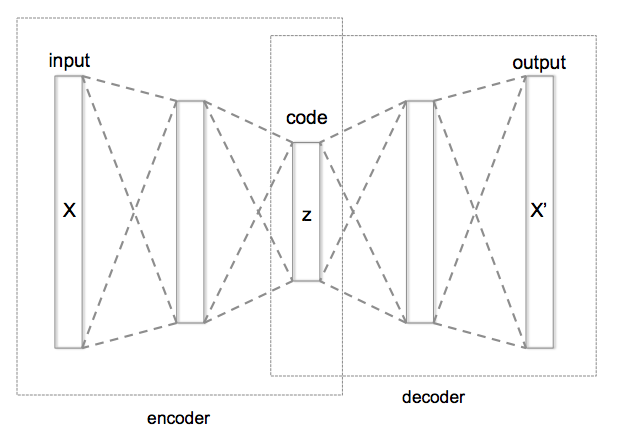
Autoencoder是一種可以將資料中的重要資訊保留下來的神經網路,有點像是資料壓縮,在做資料壓縮時,會有一個 Encoder 可以壓縮資料,另外還有一個 Decoder,可以還原資料。壓縮的過程就是用更精簡的方式保存了資料。Autoencoder 跟一般資料壓縮類似,也有 Encoder和Decoder,但 Decoder 的結果,不能確保可以完全還原。

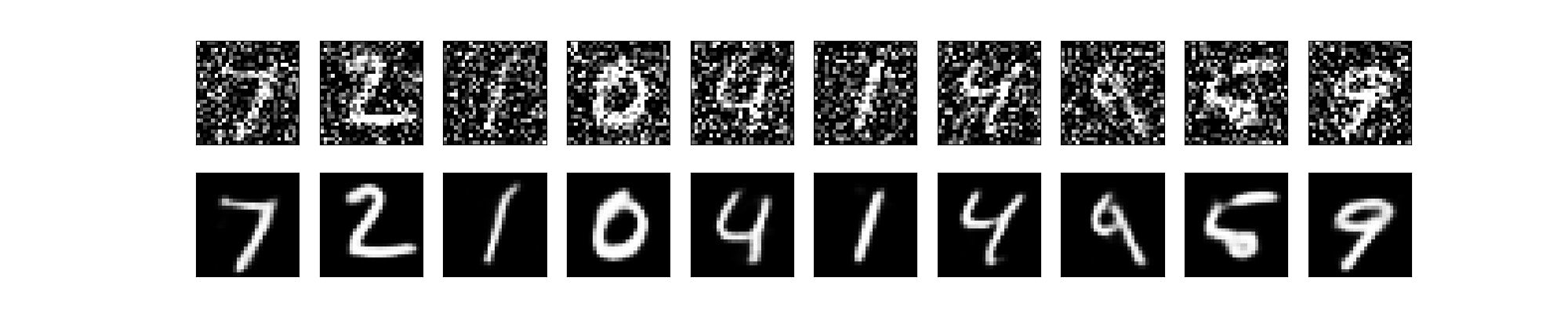
Autoencoder會試著從測試資料,自己學習出Encoder和Decoder,並盡量讓資料在壓縮後又可以還原回去。實際上最常見的應用是,對圖片進行降噪 DeNoise。Autoencoder 是一種資料壓縮/解壓縮演算法,能夠處理 (1) 特定資料 (2) 壓縮後會遺失部分資訊,也就是無法完整還原回原本的資料 (3) 可由訓練資料中自動學習壓縮的方法。特定資料的意思跟常見的語音壓縮 mp3 不同,MPEG-2 Audio Layer III (mp3),可以處理所有的語音資料,但 AutoEncoder 訓練的結果,只能處理跟訓練資料類似的語音資料。例如處理人臉圖片的 autoencoder,無法有效處理 tree 的圖片。

不管是「Encoder」還是「Decoder」都可以調整權重,如果將Encoder+Decoder的結構建立好並搭配Input當作Output的目標答案,在訓練的過程中,Autoencoder會試著找出最好的權重來使得資訊可以盡量完整還原回去,換句話說,Autoencoder可以自行找出了Encoder和Decoder。

Encoder 的效果等同於做 Dimension Reduction,Encoder會轉換原本的資料到一個新的空間,這個空間可以比原本Features描述的空間更能精簡的描述這群數據,而中間這層Layer的數值Embedding Code就是新空間裡頭的座標,有些時候我們會用這個新空間來判斷每筆資料之間的接近程度。

理論上是無法做出一個 autoencoder,其得到的壓縮效果,能夠跟類似 jpeg, mp3 這種壓縮方法一樣好,因為我們無法取得「所有」的語音/圖片資料,進行訓練。

目前 autoencoder 有兩個實用的應用:(1) data denoising 例如圖片降噪 (2) dimensionality reduction for data visulization 對於多維度離散的資料,autoencoder 能夠學習出 data projection,功能跟 PCA (Principla Compoenent Analysis) 或 t-SNE 一樣,但效果更好。(ref: 淺談降維方法中的 PCA 與 t-SNE

Simple Autoencoder

# -*- coding: utf-8 -*-
from keras.datasets import mnist
from keras.utils import np_utils
import numpy as np
np.random.seed(10)

# 讀取 mnist 資料
(x_train, y_train), (x_test, y_test) = mnist.load_data()

# 標準化
x_train = x_train.astype('float32') / 255.
x_test = x_test.astype('float32') / 255.

# 正規化資料維度,以便 Keras 處理
x_train = x_train.reshape((len(x_train), np.prod(x_train.shape[1:])))
x_test = x_test.reshape((len(x_test), np.prod(x_test.shape[1:])))

print("x_train.shape=",x_train.shape, ", x_test.shape=",x_test.shape)

# simple autoencoder
# 建立 Autoencoder Model 並使用 x_train 資料進行訓練
from keras.layers import Input, Dense
from keras.models import Model

# this is the size of our encoded representations
encoding_dim = 32  # 32 floats -> compression of factor 24.5, assuming the input is 784 floats

# this is our input placeholder
input_img = Input(shape=(784,))
# "encoded" is the encoded representation of the input
encoded = Dense(encoding_dim, activation='relu')(input_img)
# "decoded" is the lossy reconstruction of the input
decoded = Dense(784, activation='sigmoid')(encoded)

# 建立 Model 並將 loss funciton 設為 binary cross entropy
# this model maps an input to its reconstruction
autoencoder = Model(input_img, decoded)
autoencoder.compile(optimizer='adadelta', loss='binary_crossentropy')

autoencoder.fit(x_train,
                x_train,  # Label 也設為 x_train
                epochs=25,
                batch_size=128,
                shuffle=True,
                validation_data=(x_test, x_test))

##########
# 另外製作 encoder, decoder 兩個分開的 Model
# this model maps an input to its encoded representation
encoder = Model(input_img, encoded)

# create a placeholder for an encoded (32-dimensional) input
encoded_input = Input(shape=(encoding_dim,))
# retrieve the last layer of the autoencoder model
decoder_layer = autoencoder.layers[-1]
# create the decoder model
decoder = Model(encoded_input, decoder_layer(encoded_input))

# encode and decode some digits
# note that we take them from the *test* set
encoded_imgs = encoder.predict(x_test)
decoded_imgs = decoder.predict(encoded_imgs)

# use Matplotlib
import matplotlib
matplotlib.use('agg')

import matplotlib.pyplot as plt
plt.clf()
n = 10  # how many digits we will display
plt.figure(figsize=(20, 4))
for i in range(n):
    # display original
    ax = plt.subplot(2, n, i + 1)
    plt.imshow(x_test[i].reshape(28, 28))
    plt.gray()
    ax.get_xaxis().set_visible(False)
    ax.get_yaxis().set_visible(False)

    # display reconstruction
    ax = plt.subplot(2, n, i + 1 + n)
    plt.imshow(decoded_imgs[i].reshape(28, 28))
    plt.gray()
    ax.get_xaxis().set_visible(False)
    ax.get_yaxis().set_visible(False)
plt.savefig("auto.png")

訓練過程

60000/60000 [==============================] - 4s 62us/step - loss: 0.3079 - val_loss: 0.2502
Epoch 2/25
60000/60000 [==============================] - 1s 12us/step - loss: 0.2300 - val_loss: 0.2105
Epoch 3/25
60000/60000 [==============================] - 1s 12us/step - loss: 0.2009 - val_loss: 0.1898
Epoch 4/25
60000/60000 [==============================] - 1s 13us/step - loss: 0.1839 - val_loss: 0.1756
Epoch 5/25
60000/60000 [==============================] - 1s 14us/step - loss: 0.1715 - val_loss: 0.1650
Epoch 6/25
60000/60000 [==============================] - 1s 13us/step - loss: 0.1619 - val_loss: 0.1563
Epoch 7/25
60000/60000 [==============================] - 1s 12us/step - loss: 0.1540 - val_loss: 0.1490
Epoch 8/25
60000/60000 [==============================] - 1s 12us/step - loss: 0.1473 - val_loss: 0.1429
Epoch 9/25
60000/60000 [==============================] - 1s 12us/step - loss: 0.1415 - val_loss: 0.1373
Epoch 10/25
60000/60000 [==============================] - 1s 12us/step - loss: 0.1365 - val_loss: 0.1325
Epoch 11/25
60000/60000 [==============================] - 1s 12us/step - loss: 0.1320 - val_loss: 0.1282
Epoch 12/25
60000/60000 [==============================] - 1s 12us/step - loss: 0.1279 - val_loss: 0.1243
Epoch 13/25
60000/60000 [==============================] - 1s 12us/step - loss: 0.1242 - val_loss: 0.1208
Epoch 14/25
60000/60000 [==============================] - 1s 12us/step - loss: 0.1209 - val_loss: 0.1178
Epoch 15/25
60000/60000 [==============================] - 1s 12us/step - loss: 0.1180 - val_loss: 0.1151
Epoch 16/25
60000/60000 [==============================] - 1s 12us/step - loss: 0.1155 - val_loss: 0.1127
Epoch 17/25
60000/60000 [==============================] - 1s 12us/step - loss: 0.1133 - val_loss: 0.1107
Epoch 18/25
60000/60000 [==============================] - 1s 12us/step - loss: 0.1115 - val_loss: 0.1090
Epoch 19/25
60000/60000 [==============================] - 1s 12us/step - loss: 0.1098 - val_loss: 0.1075
Epoch 20/25
60000/60000 [==============================] - 1s 12us/step - loss: 0.1085 - val_loss: 0.1062
Epoch 21/25
60000/60000 [==============================] - 1s 12us/step - loss: 0.1073 - val_loss: 0.1051
Epoch 22/25
60000/60000 [==============================] - 1s 14us/step - loss: 0.1062 - val_loss: 0.1042
Epoch 23/25
60000/60000 [==============================] - 1s 13us/step - loss: 0.1053 - val_loss: 0.1033
Epoch 24/25
60000/60000 [==============================] - 1s 15us/step - loss: 0.1046 - val_loss: 0.1026
Epoch 25/25
60000/60000 [==============================] - 1s 12us/step - loss: 0.1039 - val_loss: 0.1020

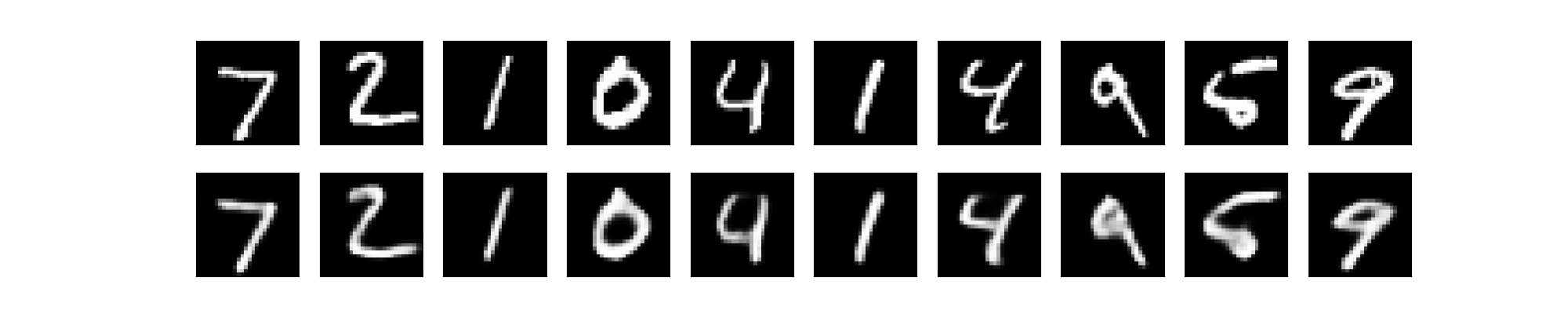
這是測試的前10 筆資料,上面是原始測試圖片,下面是經過壓縮/解壓縮後,產生的圖片,因為是簡單的 autoencoder,目前的效果還不夠好。

Sparse Autoencoder

ref: Tensorflow Day17 Sparse Autoencoder

在 encoded representation 加上 sparsity constraint

原本只有限制 hidden layer 為 32 維,在 hidden representation 加上 sparsity constraint。原本所有神經元會對所有輸入資料都有反應,但我們希望神經元只對某一些訓練資料有反應,例如神經元 A 對 5 有反應,B 只對 7 有反應。讓神經元有對每一個數字都有專業工作。

可在 loss function 加上兩項,達到這個限制

  • Sparsity Regularization
  • L2 Regularization

將 activity_regularizer 增加到 Dense Layer,並將訓練次數改為 100 次(因為增加了constraint,可以訓練更多次,而不會發生 overfitting)

# this is our input placeholder
input_img = Input(shape=(784,))
# "encoded" is the encoded representation of the input
# add a Dense layer with a L1 activity regularizer
encoded = Dense(encoding_dim, activation='relu',
                activity_regularizer=regularizers.l1(10e-5))(input_img)

# "decoded" is the lossy reconstruction of the input
decoded = Dense(784, activation='sigmoid')(encoded)

Note: 實際上這個部分測試的結果,反而變更差,目前不知道原因

Epoch 100/100
60000/60000 [==============================] - 1s 12us/step - loss: 0.2612 - val_loss: 0.2603

Deep AutoEncoder

在 encoded, decoded 從原本的一層,改為 3 層

# -*- coding: utf-8 -*-
from keras.datasets import mnist
from keras.utils import np_utils
import numpy as np
np.random.seed(10)

# 讀取 mnist 資料
(x_train, y_train), (x_test, y_test) = mnist.load_data()

# 標準化
x_train = x_train.astype('float32') / 255.
x_test = x_test.astype('float32') / 255.

# 正規化資料維度,以便 Keras 處理
x_train = x_train.reshape((len(x_train), np.prod(x_train.shape[1:])))
x_test = x_test.reshape((len(x_test), np.prod(x_test.shape[1:])))

print("x_train.shape=",x_train.shape, ", x_test.shape=",x_test.shape)

# simple autoencoder
# 建立 Autoencoder Model 並使用 x_train 資料進行訓練
from keras.layers import Input, Dense
from keras.models import Model
from keras import regularizers

# this is the size of our encoded representations
encoding_dim = 32  # 32 floats -> compression of factor 24.5, assuming the input is 784 floats

input_img = Input(shape=(784,))
encoded = Dense(128, activation='relu')(input_img)
encoded = Dense(64, activation='relu')(encoded)
encoded = Dense(32, activation='relu')(encoded)

decoded = Dense(64, activation='relu')(encoded)
decoded = Dense(128, activation='relu')(decoded)
decoded = Dense(784, activation='sigmoid')(decoded)

# 建立 Model 並將 loss funciton 設為 binary cross entropy
# this model maps an input to its reconstruction
autoencoder = Model(input_img, decoded)
autoencoder.compile(optimizer='adadelta', loss='binary_crossentropy')

autoencoder.fit(x_train,
                x_train,  # Label 也設為 x_train
                epochs=100,
                batch_size=128,
                shuffle=True,
                validation_data=(x_test, x_test))


# _________________________________________________________________
# Layer (type)                 Output Shape              Param #
# =================================================================
# input_1 (InputLayer)         (None, 784)               0
# _________________________________________________________________
# dense_1 (Dense)              (None, 128)               100480
# _________________________________________________________________
# dense_2 (Dense)              (None, 64)                8256
# _________________________________________________________________
# dense_3 (Dense)              (None, 32)                2080
# _________________________________________________________________
# dense_4 (Dense)              (None, 64)                2112
# _________________________________________________________________
# dense_5 (Dense)              (None, 128)               8320
# _________________________________________________________________
# dense_6 (Dense)              (None, 784)               101136
# =================================================================
# Total params: 222,384
# Trainable params: 222,384
# Non-trainable params: 0

decoded_imgs = autoencoder.predict(x_test)

# use Matplotlib
import matplotlib
matplotlib.use('agg')

import matplotlib.pyplot as plt
plt.clf()
n = 10  # how many digits we will display
plt.figure(figsize=(20, 4))
for i in range(n):
    # display original
    ax = plt.subplot(2, n, i + 1)
    plt.imshow(x_test[i].reshape(28, 28))
    plt.gray()
    ax.get_xaxis().set_visible(False)
    ax.get_yaxis().set_visible(False)

    # display reconstruction
    ax = plt.subplot(2, n, i + 1 + n)
    plt.imshow(decoded_imgs[i].reshape(28, 28))
    plt.gray()
    ax.get_xaxis().set_visible(False)
    ax.get_yaxis().set_visible(False)
plt.savefig("auto.png")

訓練結果 loss rate 由 0.1 降到 0.09

Epoch 100/100
60000/60000 [==============================] - 2s 33us/step - loss: 0.0927 - val_loss: 0.0925

Convolutional Autoencoder

執行前要加上環境變數

export TF_FORCE_GPU_ALLOW_GROWTH=true

執行結果

Epoch 50/50
60000/60000 [==============================] - 3s 57us/step - loss: 0.1012 - val_loss: 0.0984

Image Denoise

用加上 noise 的圖片當作 input,output 為沒有 noise 的圖片,這樣進行 model 訓練

# -*- coding: utf-8 -*-
from keras.datasets import mnist
from keras.utils import np_utils
import numpy as np
np.random.seed(10)

# 讀取 mnist 資料
(x_train, y_train), (x_test, y_test) = mnist.load_data()

# 標準化
x_train = x_train.astype('float32') / 255.
x_test = x_test.astype('float32') / 255.

# 正規化資料維度,以便 Keras 處理
x_train = np.reshape(x_train, (len(x_train), 28, 28, 1))  # adapt this if using `channels_first` image data format
x_test = np.reshape(x_test, (len(x_test), 28, 28, 1))  # adapt this if using `channels_first` image data format


# 將原圖加上 noise
noise_factor = 0.5
x_train_noisy = x_train + noise_factor * np.random.normal(loc=0.0, scale=1.0, size=x_train.shape)
x_test_noisy = x_test + noise_factor * np.random.normal(loc=0.0, scale=1.0, size=x_test.shape)

x_train_noisy = np.clip(x_train_noisy, 0., 1.)
x_test_noisy = np.clip(x_test_noisy, 0., 1.)


print("x_train.shape=",x_train.shape, ", x_test.shape=",x_test.shape)

from keras.layers import Input, Dense, Conv2D, MaxPooling2D, UpSampling2D
from keras.models import Model
from keras import backend as K

input_img = Input(shape=(28, 28, 1))  # adapt this if using `channels_first` image data format

## model

x = Conv2D(32, (3, 3), activation='relu', padding='same')(input_img)
x = MaxPooling2D((2, 2), padding='same')(x)
x = Conv2D(32, (3, 3), activation='relu', padding='same')(x)
encoded = MaxPooling2D((2, 2), padding='same')(x)

# at this point the representation is (7, 7, 32)

x = Conv2D(32, (3, 3), activation='relu', padding='same')(encoded)
x = UpSampling2D((2, 2))(x)
x = Conv2D(32, (3, 3), activation='relu', padding='same')(x)
x = UpSampling2D((2, 2))(x)
decoded = Conv2D(1, (3, 3), activation='sigmoid', padding='same')(x)

autoencoder = Model(input_img, decoded)

autoencoder.compile(optimizer='adadelta', loss='binary_crossentropy')

autoencoder.fit(x_train_noisy,
                x_train,  # Label 也設為 x_train
                epochs=100,
                batch_size=128,
                shuffle=True,
                validation_data=(x_test_noisy, x_test))


decoded_imgs = autoencoder.predict(x_test_noisy)

# use Matplotlib
import matplotlib
matplotlib.use('agg')

import matplotlib.pyplot as plt
plt.clf()
n = 10  # how many digits we will display
plt.figure(figsize=(20, 4))
for i in range(n):
    # display original
    ax = plt.subplot(2, n, i + 1)
    plt.imshow(x_test_noisy[i].reshape(28, 28))
    plt.gray()
    ax.get_xaxis().set_visible(False)
    ax.get_yaxis().set_visible(False)

    # display reconstruction
    ax = plt.subplot(2, n, i + 1 + n)
    plt.imshow(decoded_imgs[i].reshape(28, 28))
    plt.gray()
    ax.get_xaxis().set_visible(False)
    ax.get_yaxis().set_visible(False)
plt.savefig("auto.png")

結果

Epoch 100/100
60000/60000 [==============================] - 3s 56us/step - loss: 0.0941 - val_loss: 0.0941

Sequence-to-sequence Autoencoder

如果輸入的資料是 sequence,而不是 vector / 2D image,如果想要有 temporal structure 的 model 要改用 LSTM

from keras.layers import Input, LSTM, RepeatVector
from keras.models import Model

inputs = Input(shape=(timesteps, input_dim))
encoded = LSTM(latent_dim)(inputs)

decoded = RepeatVector(timesteps)(encoded)
decoded = LSTM(input_dim, return_sequences=True)(decoded)

sequence_autoencoder = Model(inputs, decoded)
encoder = Model(inputs, encoded)

Variational autoencoder (VAE)

variational autoencoder 是在 encoded representation 中增加 constraints 的 autoencoder。也就是 latent variable model,就是要學習一個原始資料統計分佈模型,接下來可用此模型,產生新的資料。

ref: variational_autoencoder.py

References

Building Autoencoders in Keras

Autoencoder 簡介與應用範例

[實戰系列] 使用 Keras 搭建一個 Denoising AE 魔法陣(模型)

機器學習技法 學習筆記 (6):神經網路(Neural Network)與深度學習(Deep Learning)

實作Tensorflow (4):Autoencoder

自編碼 Autoencoder (非監督學習)

[TensorFlow] [Keras] kernelregularizer、biasregularizer 和 activity_regularizer

2019/02/18

Keras 手寫阿拉伯數字辨識

keras 是 python 語言的機器學習套件,後端能使用 Google TensorFlow, Microsoft CNTKTheano 運作。其中 Theano 在 2017/9/28 就宣佈在 1.0 後就不再更新。一般在初學機器學習時,都是用手寫阿拉伯數字 MNIST 資料集進行測試,kaggle Digit Recognizer 有針對 MNIST data 的機器學習模型的評比,比較厲害的,都可以達到 100% 的預測結果。

CentOS 7 Keras, TensorFlow docker 測試環境

docker run -it --name c1 centos:latest /bin/bash

安裝一些基本工具,以及 openssh-server

#yum provides ifconfig

yum install -y net-tools telnet iptables sudo initscripts
yum install -y passwd openssl openssh-server

yum install -y wget vim

測試 sshd

/usr/sbin/sshd -D
Could not load host key: /etc/ssh/ssh_host_rsa_key
Could not load host key: /etc/ssh/ssh_host_ecdsa_key
Could not load host key: /etc/ssh/ssh_host_ed25519_key

缺少了一些 key

ssh-keygen -t rsa -f /etc/ssh/ssh_host_rsa_key
#直接 enter 即可

ssh-keygen -t dsa -f /etc/ssh/ssh_host_dsa_key
#直接 enter 即可

ssh-keygen -t ecdsa -f /etc/ssh/ssh_host_ecdsa_key -N ""

ssh-keygen -t ed25519 -f /etc/ssh/ssh_host_ed25519_key -N ""

修改 UsePAM 設定

vi /etc/ssh/sshd_config
# UsePAM yes 改成 UsePAM no
UsePAM no

再測試看看 sshd

/usr/sbin/sshd -D&

修改 root 密碼

passwd root

離開 docker

exit

以 docker ps -l 找到剛剛那個 container 的 id

$ docker ps -l
CONTAINER ID        IMAGE               COMMAND             CREATED             STATUS                     PORTS               NAMES
107fb9c3fc0d        centos:latest       "/bin/bash"         7 minutes ago       Exited (0) 2 seconds ago                       c1

將 container 存成另一個新的 image

docker commit 107fb9c3fc0d centosssh

以新的 image 啟動另一個 docker instance

(port 10022 是 ssh,15900 是 vnc)

(--privileged=true 是避免 systemd 發生的 Failed to get D-Bus connection: Operation not permitted 問題)

docker run -d -p 10022:22 -p 15900:5900 -e "container=docker" --ulimit memlock=-1 --privileged=true -v /sys/fs/cgroup:/sys/fs/cgroup --name test centosssh /usr/sbin/init

docker exec -it test /bin/bash

現在可以直接 ssh 登入新的 docker machine

ssh root@localhost -p 10022

修改 timezone, locale

timedatectl set-timezone Asia/Taipei

把 yum.conf 的 overrideinstalllangs 註解掉

vi /etc/yum.conf

#override_install_langs=en_US.utf8
yum -y -q reinstall glibc-common
localectl list-locales|grep zh
# 會列出所有可設定的 locale
zh_CN
zh_CN.gb18030
zh_CN.gb2312
zh_CN.gbk
zh_CN.utf8
zh_HK
zh_HK.big5hkscs
zh_HK.utf8
zh_SG
zh_SG.gb2312
zh_SG.gbk
zh_SG.utf8
zh_TW
zh_TW.big5
zh_TW.euctw
zh_TW.utf8

# 將 locale 設定為 zh_TW.utf8
localectl set-locale LANG=zh_TW.utf8

安裝視窗環境及VNC

ref: https://www.jianshu.com/p/38a60776b28a

yum groupinstall -y "GNOME Desktop"

# 預設啟動圖形介面
unlink /etc/systemd/system/default.target
ln -sf /lib/systemd/system/graphical.target /etc/systemd/system/default.target

# 安裝 vnc server
yum -y install tigervnc-server tigervnc-server-module 

# vnc 預設的port tcp 5900,則組態檔複製時在檔名中加入0,如vncserver@:0.service,如果要使用其他的port,就把0改為其他號碼
cp /lib/systemd/system/vncserver@.service /etc/systemd/system/vncserver@:0.service

vi /etc/systemd/system/vncserver@:0.service
# 修改中間的部分
ExecStartPre=/bin/sh -c '/usr/bin/vncserver -kill %i > /dev/null 2>&1 || :'
ExecStart=/usr/sbin/runuser -l root -c "/usr/bin/vncserver %i -geometry 1280x1024"
PIDFile=/root/.vnc/%H%i.pid
ExecStop=/bin/sh -c '/usr/bin/vncserver -kill %i > /dev/null 2>&1 || :'


# 執行 vncpasswd 填寫 vnc 密碼
su root
vncpasswd

# 退出 container
exit

# restart docker container
docker restart test

# 進入 docker container
docker exec -it test /bin/bash

# 啟動 service
systemctl daemon-reload
systemctl start vncserver@:0.service
systemctl enable vncserver@:0.service

# 開啟防火牆允許VNC的連線,以及重新load防火牆,這邊多開放了port 5909。
firewall-cmd --permanent --add-service="vnc-server" --zone="public"
#firewall-cmd --add-port=5909/tcp --permanent
firewall-cmd --reload

vncserver -list

# 以 vnc client 連線,連接 localhost:15900

如果用 vnc 連線到 docker 機器,後面測試時,matplotlib 可直接把圖形畫在視窗上,就不用存檔。

安裝 TensorFlow, python 3.6 開發環境

yum -y install centos-release-scl
yum -y install rh-python36

python --version
# Python 2.7.5

# 目前還是 python 2.7,必須 enable 3.6
scl enable rh-python36 bash

python --version
# Python 3.6.3

但每次登入都還是 2.7

vi /etc/profile.d/rh-python36.sh

#!/bin/bash
source scl_source enable rh-python36

接下來每次登入都是 3.6

安裝 TensorFlow

pip3 install --upgrade tensorflow

# 更新 pip
pip3 install --upgrade pip

簡單測試,是否有安裝成功

# python
import tensorflow as tf
hello = tf.constant('Hello, TensorFlow!')
sess = tf.Session()
print(sess.run(hello))

# 會列印出這樣的結果
# b'Hello, TensorFlow!'

#---------

python -c "import tensorflow as tf; tf.enable_eager_execution(); print(tf.reduce_sum(tf.random_normal([1000, 1000])))"
# 會列印出這樣的結果
# tf.Tensor(12.61731, shape=(), dtype=float32)

再安裝 keras, matplotlib (需要 tk library)

pip3 install keras

yum -y install rh-python36-python-tkinter
pip3 install matplotlib

阿拉伯數字辨識

MNIST 是一個包含 60,000 training images 及 10,000 testing images 的手寫阿拉伯數字的測試資料集。資料集的每個圖片都是解析度為 28*28 (784 個 pixel) 的灰階影像, 每個像素為 0~255 之數值。

One-Hot Encoding 就是一位有效編碼,當有 N 種狀態,就使用 N 位狀態儲存器的編碼,每一個狀態都有固定的位置。

例如阿拉伯數字就是 0 ~ 9,就使用這樣的編碼方式

[1., 0., 0., 0., 0., 0., 0., 0., 0., 0.]    代表 0
...
[0., 0., 0., 0., 0., 1., 0., 0., 0., 0.]    代表 5
...
[0., 0., 0., 0., 0., 0., 0., 0., 0., 1.]    代表 9

程式處理的步驟如下:

  1. 取得訓練資料:目前是直接使用既有的 MNIST 資料集,利用這些既有的資料,進行機器學習。
  2. 機器訓練,取得模型:進行機器訓練,取得訓練後結果的模型,未來就可以利用這個模型,判斷新進未知的資料
  3. 評估:利用 MNIST 資料集的測試資料,評估模型判斷後的結果跟正確結果的差異,取得這個模型的準確率。
  4. 預測:未來可利用這個模型,判斷並預測新進資料的結果。當然這會因為上一個步驟的準確度,有時候會失準,不一定會完全正確。

以下這個例子是使用 Sequential 線性的模型,input layer 是 MNIST 60000 筆訓練資料,中間是一層有 256 個變數的 hidden layer,最後是 10 個變數 (0~9) 的 output layer。機器學習就是在產生 input layer 到 hidden layer,以及 hidden layer 到 output layer 中間的 weight 權重。

input layer --- W(i,j) ---> hidden layer (256 個變數) --- W(j, k) ---> output layer (0~9) 

測試程式 test.py

import numpy as np
from keras.models import Sequential
from keras.datasets import mnist
from keras.layers import Dense, Dropout, Activation, Flatten
# 用來後續將 label 標籤轉為 one-hot-encoding
from keras.utils import np_utils
from matplotlib import pyplot as plt

# 載入 MNIST 資料庫的訓練資料,並分為 training 60000 筆 及 testing 10000 筆 data
(x_train, y_train), (x_test, y_test) = mnist.load_data()


# 將 training 的 label 進行 one-hot encoding,例如數字 7 經過 One-hot encoding 轉換後是 array([0., 0., 0., 0., 0., 0., 0., 1., 0., 0.], dtype=float32),即第7個值為 1
y_train_onehot = np_utils.to_categorical(y_train)
y_test_onehot = np_utils.to_categorical(y_test)

# 將 training 的 input 資料轉為 28*28 的 2維陣列
# training 與 testing 資料數量分別是 60000 與 10000 筆
# X_train_2D 是 [60000, 28*28] 的 2維陣列
x_train_2D = x_train.reshape(60000, 28*28).astype('float32')
x_test_2D = x_test.reshape(10000, 28*28).astype('float32')

x_train_norm = x_train_2D/255
x_test_norm = x_test_2D/255


# 建立簡單的線性執行的模型
model = Sequential()
# Add Input layer, 隱藏層(hidden layer) 有 256個輸出變數
model.add(Dense(units=256, input_dim=784, kernel_initializer='normal', activation='relu'))
# Add output layer
model.add(Dense(units=10, kernel_initializer='normal', activation='softmax'))

# 編譯: 選擇損失函數、優化方法及成效衡量方式
model.compile(loss='categorical_crossentropy', optimizer='adam', metrics=['accuracy'])


# 進行 model 訓練, 訓練過程會存在 train_history 變數中
# 將 60000 張 training set 的圖片,用 80% (48000張) 訓練模型,用 20% (12000張) 驗證結果
# epochs 10 次,就是訓練做了 10 次
# batch_size 是 number of samples per gradient update,每一次進行 gradient descent 使用幾個 samples
# verbose 是 train_history 的 log 顯示模式,2 表示每一輪訓練,列印一行 log
train_history = model.fit(x=x_train_norm, y=y_train_onehot, validation_split=0.2, epochs=10, batch_size=800, verbose=2)

# 用 10000 筆測試資料,評估訓練後 model 的成果(分數)
scores = model.evaluate(x_test_norm, y_test_onehot)
print()
print("Accuracy of testing data = {:2.1f}%".format(scores[1]*100.0))

# 預測(prediction)
X = x_test_norm[0:10,:]
predictions = model.predict_classes(X)
# get prediction result
print()
print(predictions)

# 模型訓練結果 結構存檔
from keras.models import model_from_json
json_string = model.to_json()
with open("model.config", "w") as text_file:
    text_file.write(json_string)

# 模型訓練結果 權重存檔
model.save_weights("model.weight")


# 顯示 第一筆訓練資料的圖形,確認是否正確
#plt.imshow(x_train[0])
#plt.show()
#plt.imsave('1.png', x_train[0])

plt.clf()

plt.plot(train_history.history['loss'])
plt.plot(train_history.history['val_loss'])
plt.title('Train History')
plt.ylabel('loss')
plt.xlabel('Epoch')
plt.legend(['loss', 'val_loss'], loc='upper left')
#plt.show()
plt.savefig('loss.png')

執行結果

# python test.py
Using TensorFlow backend.
Train on 48000 samples, validate on 12000 samples
Epoch 1/10
 - 2s - loss: 0.7582 - acc: 0.8134 - val_loss: 0.3195 - val_acc: 0.9117
Epoch 2/10
 - 1s - loss: 0.2974 - acc: 0.9160 - val_loss: 0.2473 - val_acc: 0.9307
Epoch 3/10
 - 2s - loss: 0.2346 - acc: 0.9350 - val_loss: 0.2060 - val_acc: 0.9425
Epoch 4/10
 - 2s - loss: 0.1930 - acc: 0.9465 - val_loss: 0.1741 - val_acc: 0.9522
Epoch 5/10
 - 2s - loss: 0.1631 - acc: 0.9539 - val_loss: 0.1529 - val_acc: 0.9581
Epoch 6/10
 - 2s - loss: 0.1410 - acc: 0.9604 - val_loss: 0.1397 - val_acc: 0.9612
Epoch 7/10
 - 1s - loss: 0.1225 - acc: 0.9662 - val_loss: 0.1301 - val_acc: 0.9639
Epoch 8/10
 - 1s - loss: 0.1075 - acc: 0.9695 - val_loss: 0.1171 - val_acc: 0.9668
Epoch 9/10
 - 1s - loss: 0.0948 - acc: 0.9744 - val_loss: 0.1123 - val_acc: 0.9681
Epoch 10/10
 - 1s - loss: 0.0855 - acc: 0.9771 - val_loss: 0.1047 - val_acc: 0.9700
10000/10000 [==============================] - 1s 57us/step

Accuracy of testing data = 97.1%

[7 2 1 0 4 1 4 9 6 9]

Model Persistence

要儲存訓練好的模型,有兩種方式

  1. 結構及權重分開儲存

    儲存模型結構,可儲存為 JSON 或 YAML

    from keras.models import model_from_json
    json_string = model.to_json()
    with open("model.config", "w") as text_file:
      text_file.write(json_string)

    儲存權重

    model.save_weights("model.weight")

    讀取結構及權重

    import numpy as np  
    from keras.models import Sequential
    from keras.models import model_from_json
    with open("model.config", "r") as text_file:
      json_string = text_file.read()
      model = Sequential()
      model = model_from_json(json_string)
      model.load_weights("model.weight", by_name=False)
  2. 合併儲存結構及權重

    合併儲存時,檔案格式為 HDF5

    from keras.models import load_model
    
    model.save('model.h5')  # creates a HDF5 file 'model.h5'

    讀取模型

    from keras.models import load_model
    
    # 載入模型
    model = load_model('model.h5')

References

【深度學習框架 Theano 慘遭淘汰】微軟數據分析師:為何曾經熱門的 Theano 18 個月就陣亡?

【Python】CentOS7 安裝 Python3

Install TensorFlow with pip

撰寫第一支 Neural Network 程式 -- 阿拉伯數字辨識

MyNeuralNetwork/0.py

改善 CNN 辨識率

mnist-cnn/mnist-CNN-datagen.ipynb

深度學習 TensorFlow